Most visitors decide whether a product is worth their time in under 10 seconds. Written documentation doesn't survive that window. Video often does. According to Brightcove and Ascend2's B2B buyer research, 91% of technology buyers prefer video over written content when learning about complex products — and 83% would rather take a product tour via video than read about it.
This article covers the most effective product demo and explainer video formats for tech companies, five real-world examples worth studying, what separates the good ones from the forgettable, and how to choose a production partner who actually understands technical storytelling.
Key Takeaways
- Demo videos show your product in action; explainer videos sell the value through story — most tech companies need both
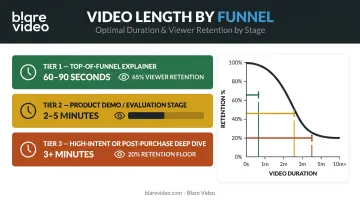
- Target 60–90 seconds for top-of-funnel awareness, 2–5 minutes for evaluation-stage demos
- The best examples (Dropbox, Slack, Grammarly) lead with a recognized problem before showing any product
- Format choice (animated, screencast, live-action) should match where the viewer is in the buying journey
- A production partner with tech-specific experience will shorten your timeline and improve your outcome
What Are Product Demo & Explainer Videos for Tech Companies?
These two formats are often treated as interchangeable, but they serve distinct purposes.
A product demo video shows the software working — real interface, actual workflows, features in context. The viewer sees what using the product looks like before they ever sign up. An explainer video communicates why the product matters, usually through narrative, character, and visual storytelling — often without ever showing a UI.
They're complementary, not competing:
| Format | Primary Goal | Typical Funnel Stage |
|---|---|---|
| Explainer Video | Communicate why the product matters | Top of funnel (awareness) |
| Product Demo Video | Show how the product works | Mid-funnel (consideration) |
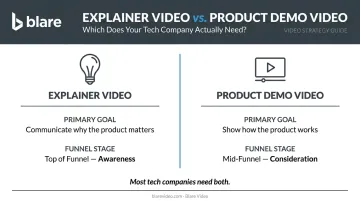
Many tech companies need both — an explainer to spark interest, and a demo to answer "but how does it actually work?" for buyers who are closer to a decision.
Why does video outperform documentation here? Wyzowl's 2024 survey found 96% of people have watched an explainer video to learn about a product or service, and 85% say a marketing video convinced them to buy. For SaaS and enterprise platforms, where the product itself is invisible until you're inside it, that conversion path matters enormously.
Not all tech videos deliver on that potential, though. Length, pacing, and whether you lead with the problem or the feature — these choices separate videos that convert from ones that get skipped.
Types of Tech Product Demo & Explainer Videos
Choosing a video format is a strategic decision, not just a creative one. A homepage awareness video has different requirements than a mid-funnel product walkthrough or a post-purchase onboarding guide.
Animated Explainer (2D/Motion Graphics)
The most common format for SaaS and software companies. Flat visuals, motion graphics, and voiceover can represent abstract workflows, data flows, and system integrations that live-action cameras can't capture cleanly. Best suited for top-of-funnel use on landing pages and paid social, where you need to communicate a value proposition quickly to audiences who may be new to the category.
Screencast / UI Demo
Screen recordings paired with voiceover and animated callouts. This is the most practical way to show real software behavior — real clicks, real outputs, real interface. Best suited for:
- Feature launch pages where buyers want to see capabilities in action
- Onboarding sequences guiding new users through key workflows
- Mid-funnel evaluation content for product-curious buyers seeking proof
Live-Action & Mixed Media
Live-action builds trust in ways animation can't. Faces, real environments, and genuine reactions build credibility — especially in B2B contexts where the purchase decision involves real risk.
Mixed media — live-action footage with animated overlays — combines both: emotional resonance from real people with explanatory clarity from motion graphics. Slack's most recognized demo video used exactly this approach.
Best Product Demo & Explainer Videos for Tech Companies
These five examples were selected for narrative strategy and format execution — not just production value.
Dropbox
Background: Dropbox's 2009 explainer video, produced by Common Craft, used simple paper-cutout 2D animation when the company was still a startup. It went on to earn more than 25 million views and was viewed roughly 30,000 times per day according to Dropbox — remarkable reach for pre-social-media-era SaaS content.
Why it works: The video opened with the everyday frustration — USB drives, emailed attachments, out-of-sync files across devices — before a single Dropbox feature appeared on screen. That problem-first structure gave viewers an immediate reason to care about the solution.
| Element | Detail |
|---|---|
| Video Style | 2D paper-cutout animation |
| Approximate Length | ~2 minutes |
| Key Technique | Problem-first narrative, relatable everyday scenarios, conversational voiceover |
Slack
Background: Slack's 2014 "So Yeah, We Tried Slack" video — a 2:20 live-action workplace story produced by Sandwich — followed office workers stuck in fragmented communication before discovering Slack. Adweek later noted the Sandwich team helped make Slack famous, returning for a work-from-home sequel in 2020.
Why it works: The video never listed a feature. It told a recognizable workplace story and let viewers project themselves onto the characters. The product felt like a cultural shift rather than a chat tool — a harder thing to achieve than any feature comparison chart could deliver.
| Element | Detail |
|---|---|
| Video Style | Live-action with animated overlays |
| Approximate Length | ~2 minutes 20 seconds |
| Key Technique | Character-driven storytelling, cultural relatability, single clear CTA |

Microsoft Azure
Background: Microsoft publishes official Azure animation explainers — including the Azure Security Center Animation Video and Azure Cognitive Services Overview — using clean 2D motion graphics to explain cloud infrastructure and AI services to both IT and business decision-maker audiences.
Why it works: Cloud infrastructure is genuinely difficult to visualize. Azure's animated explainers use minimalist iconography (server diagrams, network maps, deployment timelines) to make abstract technical concepts legible without dumbing them down. The tone stays technical-but-accessible — not oversimplified, not jargon-heavy.
| Element | Detail |
|---|---|
| Video Style | 2D motion graphics |
| Approximate Length | ~2 minutes (per official Azure explainer pages) |
| Key Technique | Minimalist visual system, use-case-led structure, dual-audience tone |
Monday.com
Background: Monday.com's official product demo (published July 2024) opens directly with the platform in action — no metaphor, no setup story, just the product running across multiple business functions from the first frame.
Why it works: This approach works because monday.com is competing in a crowded, well-understood category. Viewers already know what project management software does. The demo's job was to show differentiation through confident pacing and feature sequencing — and it does that efficiently in around two minutes.
| Element | Detail |
|---|---|
| Video Style | UI demo / product walkthrough |
| Approximate Length | ~2 minutes |
| Key Technique | Feature-in-action sequencing, benefit-not-feature framing, punchy voiceover |
Grammarly
Background: Grammarly's live-action explainer campaign, documented by We Are Royale (published in 2019), uses on-location shooting with UI/product elements tracked into the footage. The videos embed the product demonstration inside human storytelling rather than leading with the interface.
Why it works: Instead of showing grammar correction as a feature, the video sold the outcome — clearer communication, real connection. The product works invisibly in the background of a human story, which makes the benefit feel earned rather than advertised.
This model translates directly to any SaaS product with a functional but low-glamour use case. Blare Video has applied the same framework for tech clients: for Famous Software, the narrative centered on urgency and time management in produce supply chains rather than the feature list. For LeanData, customer testimonials and leadership interviews communicated B2B data expertise to prospective clients.
| Element | Detail |
|---|---|
| Video Style | Live-action with product UI overlay |
| Approximate Length | Not officially confirmed |
| Key Technique | Emotional storytelling, invisible product demo, benefit-led narrative |
What Makes a Great Tech Product Demo or Explainer Video
Five elements separate videos that convert from videos that get watched once and forgotten.
Lead With the Problem
The most effective tech videos spend the first 30–40% of their runtime on a pain point the viewer immediately recognizes. Dropbox didn't open with cloud storage. It opened with a USB drive falling behind a couch. That emotional hook primes the audience to receive the solution with genuine interest, rather than tune out.
Match Length to Funnel Stage
Vidyard's 2023 video length guide recommends:
- 60–90 seconds for top-of-funnel explainers
- 2–5 minutes for product demos and evaluation-stage content
- 3+ minutes only for high-intent or post-purchase deep dives
Vidyard's 2025 benchmark data reinforces why this matters: videos under one minute retain 65% of viewers to the end, while videos over 20 minutes hold just 20%.
Write Scripts for the Ear
Video scripts aren't copy. The best ones are conversational, jargon-free, and tested by reading aloud at normal speaking pace. The goal is to sound like someone explaining the product to a colleague over coffee, not reciting a feature specification. If a sentence requires two reads to understand, rewrite it.
Maintain Visual Consistency
In B2B contexts, visual inconsistency signals a lack of polish — and polish is part of what buyers are evaluating. Watch for these common offenders:
- Fonts that don't match your product UI or marketing site
- Color palettes that drift from brand guidelines
- Animation styles that shift between scenes
- Motion graphics that feel borrowed from a template
Every visual element should feel like it belongs to the same system.
End With One CTA
Pick one next step: a free trial, a demo booking, or a product tour. Multiple competing calls to action don't give viewers more options; they create friction that reduces the likelihood of any action being taken. Place it at the natural endpoint of the video — not mid-way, and not as an afterthought over the final frame.
How to Choose a Video Production Partner for Your Tech Company
The wrong production partner doesn't just cost you money. It costs you revision cycles, misaligned messaging, and a final product that looks polished but fails to communicate your product's actual value.
Look for Tech-Specific Experience
There's a meaningful difference between a general video agency and one that has worked with SaaS platforms, enterprise software, or hardware companies. Tech products require a partner who asks the right questions during script development — about buyer personas, competitive context, and the specific objection the video needs to overcome.
Ask for examples where they simplified an abstract workflow or technical value proposition, not just examples where they produced something that looks good.
Evaluate Full-Service Capability
Handoff gaps between agencies slow projects and create inconsistencies. Confirm your partner handles the full workflow:
- Script development and concept
- Storyboarding
- Production (animation, live-action, or both)
- Voiceover recording
- Post-production, motion graphics, and color
- Delivery in platform-ready formats
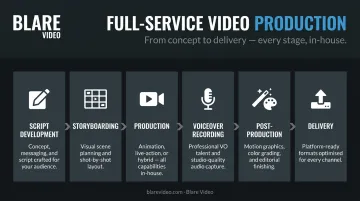
Blare Video offers end-to-end production from concept through delivery for tech and corporate clients — including work with Google, TikTok, LeanData, and Famous Software — with production teams across more than 20 US markets, from Los Angeles and San Francisco to New York, Chicago, and Atlanta.
Require Outcome Evidence
Aesthetics are table stakes. The more useful question is: what happened after the video launched?
The best production partners can point to concrete results:
- Demos that reduced onboarding friction
- Landing pages where engagement measurably improved
- Sales cycles that shortened because reps had a stronger leave-behind
If a partner can only show you a reel, keep looking.
Frequently Asked Questions
What is a product demo video?
A product demo video shows a software or tech product working in real scenarios, demonstrating its interface, key features, and workflows so potential customers understand what it does and why it matters. Unlike a marketing video, it shows the actual product in action rather than describing it in abstract terms.
How long should a product demo video be?
Top-of-funnel and homepage videos should target 60–90 seconds. Detailed feature demos or onboarding walkthroughs can run 2–5 minutes. The right length depends on where in the buying journey the viewer is watching — shorter for awareness, longer for evaluation.
What are the two types of demo?
A live or interactive demo is a real-time walkthrough, typically led by a salesperson or delivered through an in-app guided tour. A recorded demo is a produced asset that shows the product in action on demand, without a live presenter, making it easy to scale across sales and marketing channels.
How much does an explainer video cost?
Professional explainer video production typically ranges from $5,000 to $25,000+, depending on animation complexity, length, voiceover requirements, and whether the project uses custom illustration or live-action footage.
What are SaaS product videos?
SaaS product videos are explainer or demo videos specifically designed for software-as-a-service companies. They showcase how the platform works, its key features, and the business outcomes it delivers. They're used across landing pages, sales outreach, and customer onboarding.
Conclusion
The thread connecting every strong example in this article — Dropbox, Slack, Azure, Monday.com, Grammarly — is the same: they make the viewer feel understood before they show any product. The problem comes first. The solution follows. The call to action closes.
That structure is what converts skeptical buyers into interested prospects — not a creative preference, but a proven pattern.
If your tech company is ready to produce a product demo or explainer video that actually does that work, Blare Video works with technology companies across the US — from concept and script through production and delivery — with production teams in over 20 cities nationwide, including Los Angeles, New York, Chicago, San Francisco, Dallas, Atlanta, and more. Schedule a free consultation to talk through your project.