Introduction
Most event planners struggle to budget for live streaming — not because the information doesn't exist, but because vendor quotes vary so wildly it's hard to know what's normal. The global live streaming market was valued at $87.55 billion in 2023 and is projected to reach $345.13 billion by 2030, growing at 23.0% annually as hybrid and virtual attendance become standard for corporate events and conferences.
That growth hasn't made pricing any more transparent.
Costs range from a few hundred dollars for a basic setup to tens of thousands for full professional production. That spread causes chronic underbudgeting, poor vendor selection, and overpaying for features the event doesn't actually need.
This guide breaks down pricing tiers, the key factors driving cost, what each cost covers, and how to build a realistic budget for your event.
Key Takeaways
- Basic DIY setups run $100–$750; professional single-camera productions cost $1,500–$5,000; full multi-camera corporate productions reach $10,000–$50,000+
- Price drivers include camera count, professional crew, platform quality, audience size, and event duration
- Small internal meetings and tight-budget community events can use lower-cost options without significant brand risk
- High-visibility events like product launches and conferences justify higher spend — streaming failure carries real brand risk
How Much Does Event Live Streaming Cost?
There is no fixed price for live streaming an event. Costs depend on production complexity, crew size, platform requirements, and the audience experience you need to deliver. Underbudgeting typically forces you to cut corners on audio or reliability—the first things viewers notice and the fastest path to audience drop-off.
The three tiers below map to real-world production setups. Match your event type and audience expectations to find the right range.
Basic Live Streaming ($100–$750)
What's Typically Included:
- Single camera (smartphone or entry-level webcam)
- Free or low-cost streaming platforms (YouTube Live, Facebook Live)
- Basic tripod setup
- No professional crew or switching
- Minimal audio setup (built-in device microphone)
Best For:
- Small internal meetings with fewer than 50 attendees
- Personal events or community streams
- Organizations testing live streaming for the first time
- Events where video quality won't affect brand perception
Mid-Tier Professional Streaming ($1,500–$10,000)
What's Typically Included:
- Two to four professional cameras with trained operators
- Professional audio setup including lavalier or boom microphones
- Live switching between camera angles
- Branded overlays or lower thirds
- Paid streaming platform with analytics and password protection
- At least one technical director or producer managing the stream
Blare Video works in this tier, handling multi-camera production for corporate conferences, town halls, and brand events across Los Angeles, San Diego, Las Vegas, and other major markets.
Who It's Right For:
- Corporate conferences and internal town halls
- Product launches targeting external audiences
- Nonprofit galas with donor attendance
- Company events where video quality directly reflects brand standards
High-End Production Streaming ($15,000–$100,000+)
What's Typically Included:
- Six or more cameras including robotic or drone setups
- Full professional crew: technical director, camera operators, audio engineer, graphics operator
- Dedicated production switcher and encoding hardware
- Custom-branded streaming environment with professional graphics
- Bonded cellular or dedicated fiber internet connection
- On-site technical support and backup systems throughout the event
Best For:
- Large-scale conferences with 1,000+ virtual attendees
- Multi-day summits requiring consistent production quality
- Live concerts or entertainment broadcasts
- Broadcast-level events targeting national or global audiences
Key Factors That Affect Event Live Streaming Costs
Five variables drive the majority of live streaming costs: crew size, camera count, platform choice, internet infrastructure, and event logistics. Get a handle on each one and you can build a realistic budget before the first vendor quote arrives.
Number of Cameras and Production Complexity
A single-camera stream requires one operator and minimal equipment. A multi-camera setup requires a technical director to switch between feeds live, sharply increasing both crew size and equipment costs. Each additional camera angle typically adds hundreds to thousands of dollars depending on camera grade and operator skill level.
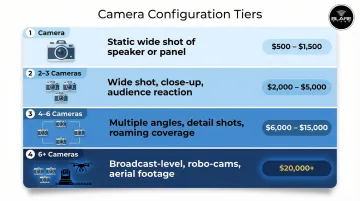
Typical camera configurations:
- 1 camera: Static wide shot of speaker or panel
- 2-3 cameras: Wide shot, speaker close-up, audience reaction
- 4-6 cameras: Multiple speaker angles, audience, detail shots, roaming coverage
- 6+ cameras: Broadcast-level coverage with specialty angles, robo-cams, or aerial footage
Crew Size and Expertise
Labor now accounts for 30 to 50 percent of total event AV budgets, making crew costs the single largest expense category for professional productions. Each crew role carries its own day-rate range:
- Camera operator: $600–$1,500/day depending on experience and market
- Audio engineer: $400–$1,200/day
- Technical director: $1,000–$5,000/day for experienced switcher operators
- Producer or streaming specialist: $500–$2,500/day
For most corporate events, crew alone consumes the largest share of your total budget — often more than equipment and platform costs combined.
Streaming Platform and Audience Scale
Free platforms like YouTube Live and Facebook Live work for small audiences but come with trade-offs: ads, limited analytics, no password protection, and potential copyright interruptions. Paid platforms cost $75–$500/month and offer custom branding, detailed analytics, password protection, and pay-per-view capabilities.
Platform pricing models:
- Flat monthly subscription: Vimeo, Dacast, Wowza
- Usage-based billing: Cloudflare Stream, AWS CloudFront
- Per-viewer pricing: Some enterprise CDN providers
Audience size matters. Vimeo enforces a strict 2 TB per month bandwidth limit on standard plans, pushing high-traffic events toward Enterprise plans costing $6,000+/year.
Internet and Connectivity Infrastructure
Your platform choice only matters if the underlying connection can support it. Venues without hardwired gigabit internet may require bonded cellular encoding solutions or temporary fiber drops, adding $700–$12,000+ depending on location and provider.
Venue-provided internet carries a steep premium. The Javits Center, for example, charges $1,538 for a basic internet drop and over $78,000 for a 101–500 Mbps managed service. Bonded cellular solutions bypass those fees by aggregating multiple 4G/5G connections into one stable upload pipe.
Event Duration, Location, and Travel
Most production companies quote by the half-day or full day, so multi-day events multiply costs proportionally. Several logistics factors layer on top of that base rate:
- Market location: Major markets like Los Angeles or Las Vegas carry different rate structures than mid-sized cities
- Travel and lodging: Out-of-region crew require covered travel time, flights, and hotel stays
- Equipment freight: Shipping or trucking gear to remote venues adds cost and lead time
- Load-in/load-out: Complex venues may require additional labor hours before and after the event
Full Cost Breakdown: What You're Actually Paying For
Vendor quotes for live streaming bundle several distinct cost categories. Knowing what each one covers helps you compare bids accurately and catch hidden expenses before you commit.
Equipment Costs (One-Time or Rental)
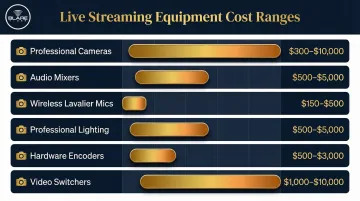
Professional streaming requires specialized equipment with significant replacement value:
- Professional cameras: $300–$10,000 each to rent or own
- Audio mixers: $500–$5,000
- Wireless lavalier microphones: $150–$500 each
- Professional lighting: $500–$5,000
- Hardware encoders: $500–$3,000
- Video switchers: $1,000–$10,000
Professional production companies own and bring this equipment as part of their service fee, which is often more affordable than renting independently and managing setup yourself.
Crew Labor (Day Rates)
Crew labor typically represents the largest single cost category in mid-to-high-tier productions:
- Camera operator: $600–$1,500/day
- Audio engineer: $400–$1,200/day
- Technical director: $1,000–$5,000/day
- Producer or streaming specialist: $500–$2,500/day
In union markets like Los Angeles and New York, IATSE minimums set a baseline of $755/day for camera operators and $843/day for audio engineers.
Pre-Production and Setup Costs
Larger events often require a dedicated setup and rehearsal day before the live event, with labor and logistics typically running $2,000–$10,000 for complex productions. That day covers:
- Venue walkthroughs and site assessment
- Equipment checks and cable runs
- Encoding tests and stream quality validation
- Platform configuration and backup stream setup
Skipping this step is one of the most common sources of day-of failures.
Streaming Platform and Delivery Costs (Recurring)
Beyond the event itself, budget for recurring platform and delivery expenses:
- Streaming platform subscriptions ($75–$500/month)
- CDN delivery fees for large audiences
- Optional add-ons: live captioning, multi-language support, interactive Q&A tools, or audience polling ($500–$5,000 depending on scope)
- Post-event replay hosting and edited highlight reel production
Live professional captioning costs $1.85/minute, while on-site CART providers charge $130/hour for one provider or $175/hour for two.
DIY vs. Professional Live Streaming: What's the Difference?
Both approaches can technically get your event online, but they serve different goals. DIY prioritizes accessibility over polish. Professional production prioritizes reliability and an experience that reflects your organization's standards.
Quality, Reliability, and Brand Perception
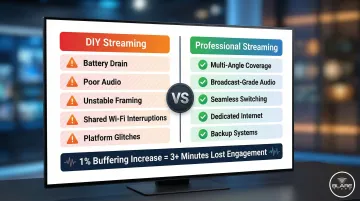
Professional setups deliver multi-angle coverage, broadcast-grade audio, and seamless switching between shots. DIY setups are prone to battery drain, poor audio, unstable framing, shared Wi-Fi interruptions, and platform glitches. For events representing a brand to an external audience, these quality gaps damage brand perception directly.
A 1% increase in buffering can reduce user engagement by more than three minutes for a 90-minute live event. Viewers abandon videos that take more than 2 seconds to start. Poor quality isn't just annoying—it's measurably costly.
When DIY Makes Sense vs. When to Hire a Pro
Use DIY for:
- Internal meetings with fewer than 50 attendees
- Low-stakes community events
- Test streams before committing to full production
- Events where technical failure carries no reputational risk
Hire a professional production company when:
- The event is client-facing or involves paid tickets
- Sponsorships or partnerships are involved
- The stream represents the brand publicly
- Technical failure or poor quality would directly threaten your brand's reputation
How to Estimate the Right Live Streaming Budget for Your Event
The "right" budget isn't about finding the cheapest option—it's about matching production quality to the event's audience, goals, and brand stakes.
Key Questions to Answer Before Budgeting
- How large is your audience, and where are they located? Large or geographically distributed audiences require more robust platform infrastructure and higher bandwidth capacity.
- Is this stream external-facing or internal? External events carry higher brand risk, which justifies greater production investment.
- Do you need post-event replay, highlight cuts, or edited recordings? Budget an additional $500–$5,000 for professional editing and highlight reel production.
- What is the venue's internet infrastructure? Venues without dedicated gigabit connections may require bonded cellular solutions or temporary fiber drops — typically $700–$12,000+.
Once you've answered these questions, you're better positioned to spot where budgets commonly go wrong.
Common Budgeting Mistakes to Avoid
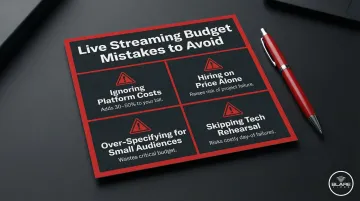
- Ignoring platform and setup costs. The production quote is just the starting point. Platform fees, bandwidth, and setup-day labor can add 30–50% to the final bill.
- Hiring based on price alone. Inexperienced operators and consumer-grade equipment raise failure risk significantly — low bids often mean corners cut where it matters most.
- Over-specifying for small audiences. Drone cameras, custom CDN architecture, and robotic systems rarely make sense for internal events with fewer than 500 viewers.
- Skipping the tech rehearsal. A pre-event setup and testing day is one of the highest-ROI line items in any live streaming budget. Cut it, and you're betting the entire event on day-of troubleshooting.
Frequently Asked Questions
How much does it cost to live stream an event?
Costs range from roughly $100–$750 for basic DIY setups, $1,500–$10,000 for mid-tier professional productions, and $15,000–$100,000+ for high-end multi-camera events. The final number depends on crew size, equipment, platform, and event complexity.
What's the best way to livestream an event?
For small or internal events, a smartphone and a paid streaming app can work. Corporate or public-facing events call for a professional production company with dedicated equipment, an experienced crew, and a reliable platform.
Can I live stream an event for free?
Yes, but free platforms like YouTube Live and Facebook Live come with real trade-offs: ads, copyright-triggered interruptions, no dedicated support, and limited audience control. For professional or brand-facing events, paid solutions are strongly recommended.
How many cameras do I need to live stream an event?
A single camera is sufficient for basic webinars or small talks. Two to four cameras are typical for professional corporate events to capture speaker close-ups, wide shots, and audience reaction. Larger productions with panels or concerts may use six or more cameras.
What internet speed do I need to live stream an event?
HD streaming at 1080p requires a minimum upload speed of 10–15 Mbps, while 4K streaming requires 30–50 Mbps. A dedicated, hardwired connection is strongly preferred over shared Wi-Fi. Backup cellular or bonded LTE solutions should be considered for critical events.
Is it worth hiring a professional live streaming company for a corporate event?
For client-facing events, conferences, or any stream where technical failure carries brand or financial risk, hiring a professional company is worth the investment. They bring backup equipment, experienced operators, platform expertise, and the ability to problem-solve in real time.