Many clients find post-production opaque. What exactly happens between the shoot and the final file? Why does it take weeks? What are editors actually doing? This guide answers those questions directly — covering what NLE is, how it differs from older methods, what the workflow looks like step by step, and how to get the most out of the process whether you're a first-time client or a seasoned producer.
Key Takeaways
- NLE is a digital editing method that lets editors access and modify any clip at any time without altering the original source footage
- Unlike tape-based linear editing, NLE makes revisions instant and non-destructive — no re-recording, no lost takes
- The standard workflow moves through footage ingest, rough cut, client review, picture lock, color grading, and final export
- Most professional editors work in Adobe Premiere Pro, DaVinci Resolve, Final Cut Pro, or Avid Media Composer — each suited to different project scales
- Proxy workflows, sequence versioning, and defined review rounds prevent scope creep on complex productions
What Is Non-Linear Video Editing?
Non-linear editing is a digital method that gives editors random access to any clip, frame, or sequence in a project — at any point, in any order — without altering the original source files.
That last part matters. NLE software doesn't cut into your footage. Instead, it records an Edit Decision List (EDL) (described by Avid as "a list of instructions for all the edits you make for creating a program") which tells the software exactly which portions of which files to play back, and in what order. The source media stays untouched throughout.
How NLE Became the Standard
Lucasfilm's EditDroid debuted at the 1984 National Association of Broadcasters convention as one of the first computer-based non-linear editing systems. Five years later, Avid Media Composer launched in 1989 as the first nonlinear professional video editing software , shifting high-end editing from specialized hardware suites to software running on computers.
What once required a dedicated machine room and a team of technicians now runs on a single laptop.
What "Random Access" Actually Means
Linear editing required physically winding tape to a specific point before you could work there, like being forced to read a book only from the beginning. NLE removes that constraint entirely. Need to fine-tune a moment from the middle of a three-hour conference recording? Two clicks.
This isn't just convenient — it enables a fundamentally different creative process. Editors can experiment freely, compare cut versions side by side, and roll back any decision without touching the original footage.
NLE vs. Linear Editing: Understanding the Difference
Linear editing was the industry standard from the 1950s through the 1990s, built around tape-to-tape assembly. According to Sony Pro, assemble editing required rewinding to the change point and re-recording every segment that followed. Insert editing could replace a section only if the new clip matched the original length exactly.
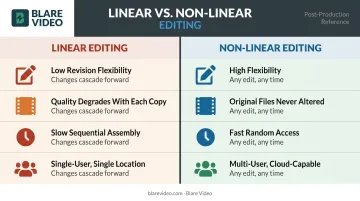
Think of linear editing as writing on a typewriter — no undo, no rearranging. Any change downstream of your edit meant redoing everything that followed it. The table below shows how that compares to NLE in practice.
| Attribute | Linear Editing | Non-Linear Editing |
|---|---|---|
| Revision flexibility | Low — changes cascade forward | High — any edit at any time |
| Quality preservation | Degrades with each copy generation | Original files never altered |
| Speed | Slow; sequential assembly | Fast; random access |
| Collaboration | Single-user, single-location | Multi-user, cloud-capable |
Linear principles haven't disappeared entirely. Live broadcast switching and real-time playout workflows still operate on sequential logic — which is why production switchers from manufacturers like Sony and Ross Video remain active in broadcast environments. For post-production, NLE took over because it gave editors what tape never could: the freedom to change their minds without losing their work.
Core Benefits of Non-Linear Editing in Post-Production
Creative Freedom Without the Risk
Editors can start anywhere in a project, try a cut, hate it, and revert in seconds. Every version of an edit can be saved as a separate sequence — rough cut, director's cut, client cut — and compared side by side. Nothing is ever lost.
This trial-and-error approach isn't sloppy; it's how strong edits get made. The freedom to experiment without consequences produces better creative decisions than committing to every choice the first time.
Efficiency in Complex Projects
A 2002 Post Magazine case study reported that Sony's Xpri NLE system reduced post-production time by approximately 35% by eliminating downconversion and conform steps (the format translation and final assembly phases that traditionally added days to a timeline) — a meaningful efficiency gain even as a single data point. Modern NLE workflows add further acceleration through:
- Clip bins and metadata tagging — locate any take in seconds by scene, camera angle, or take number instead of scrubbing through raw footage
- Multi-camera sequence editing — switch between synced angles in real time, cutting multicam interviews or live events without manual alignment
- Integrated color, audio, and graphics — finish inside one platform and skip the format conversion errors that come with handing off between applications
Keeping work inside one platform also reduces render time — an underrated time cost on longer corporate or commercial projects.
Collaboration That Scales
Modern NLE systems support shared media servers, multi-user project access, and cloud-based review workflows. Distributed post-production has become standard — remote editors, on-site colorists, and client reviewers in different cities all need access to the same project without waiting on hard drive transfers or emailed exports.
For corporate productions with marketing teams, legal reviewers, and executive approvers spread across locations, this collaborative capability isn't a nice-to-have. It's a workflow requirement.
The NLE Post-Production Workflow: Step by Step
Ingesting and Organizing Footage
Everything starts with ingest: all raw footage, audio files, graphics assets, and reference materials are imported into the NLE and organized into bins or folders before a single cut is made.
At Blare Video, this stage includes backing up footage multiple times on set before it ever reaches the editing room. Since most projects are captured in 4K or higher resolution, the team transcodes footage into 1080 HD proxy files to make editing more manageable — a standard practice across all their corporate and event projects.
A disorganized media library forces editors to hunt for clips instead of cutting. Professional teams establish naming conventions and folder structures first; everything else follows.
Rough Cut and Assembly Edit
The assembly edit is where structure emerges. Editors select the best takes and arrange them in a sequence that follows the script, shot list, or story arc. The goal at this stage is story logic — pacing, transitions, and polish come later.
Once the rough cut is ready, clients review and provide notes. Blare Video manages this stage using Wipster, a dedicated video review platform. The workflow looks like this:
- The first cut is uploaded to Wipster and a link is sent to the client
- Clients pause the video at any point and leave timestamped notes directly on the frame
- The editing team sees comments in real time, responds, and checks off completed items
- The audit trail shows exactly who approved what and when
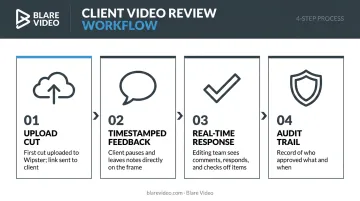
This approach keeps feedback centralized and prevents revisions from getting buried in email threads. Blare Video's standard packages include two rounds of revisions — a structured limit that keeps projects moving rather than spinning through endless cycles.
Picture Lock, Color Grading, and Audio
Picture lock is the formal moment when all editorial decisions are finalized. No more clip changes after this point — the cut is locked, and post-production moves into finishing.
Color grading happens in two stages. Color correction establishes consistent exposure and white balance across clips. Creative grading shapes the visual tone: the difference between a warm, approachable brand feel and a cool, clinical look.
Blare Video's post-production services include DaVinci color correction. DaVinci Resolve is the dominant tool for this work across broadcast, streaming, and corporate production.
Audio post-production runs in parallel or immediately after: dialogue cleanup, music mixing, sound effects, and level balancing. Audiences will forgive imperfect visuals far more readily than they tolerate unclear or unbalanced audio — a polished video with muddy sound consistently underperforms a simpler one with clean mix.
Export and Delivery
Final export produces the deliverable files in whatever formats the project requires:
- H.264 / H.265 — web, social media, and streaming; H.265 delivers smaller file sizes at equivalent quality
- Apple ProRes — broadcast and archival; an intra-frame codec designed for editing flexibility
- Multiple aspect ratios — 16:9 for YouTube, 9:16 for vertical social platforms, 1:1 for square formats
Blare Video routinely delivers multiple aspect ratios from a single project, editing horizontal cuts for YouTube alongside vertical and square formats for Instagram — maximizing output from a single edit session.
Popular NLE Software Used by Professionals
The four platforms that define professional post-production:
| Platform | Known For | Notable Usage |
|---|---|---|
| Adobe Premiere Pro | Corporate, commercial, documentary | 60% of 2025 Sundance films edited on Premiere Pro; 85% of 2026 Sundance entrants used Adobe Creative Cloud |
| DaVinci Resolve | Color grading; free version available for full NLE work | Used on feature films and broadcast television worldwide |
| Final Cut Pro | Mac-based workflows, broadcast | Dominant in Mac-native broadcast workflows; widely used across independent and network television production |
| Avid Media Composer | Film, major broadcast | 87% of 2026 Oscar-winning productions used Avid tools; 8 of 10 Best Picture nominees |
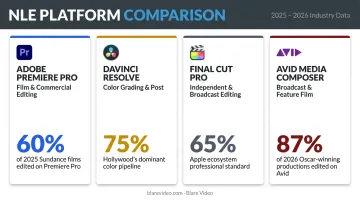
Software choice follows project requirements, not personal preference. Each platform has a natural home: Premiere Pro fits corporate and commercial work because of its Creative Cloud ecosystem, while DaVinci Resolve dominates at the color stage — and increasingly handles full editorial on high-end productions.
That color dominance is why Blare Video's post-production services include DaVinci color correction specifically. For commercials and corporate projects where final image quality matters, it's the industry's standard finishing tool.
Tips for Getting the Most Out of NLE Post-Production
A few practical habits separate fast, clean edits from frustrating ones. These apply whether you're cutting a two-minute corporate video or a multi-camera event with six hours of footage.
Organize Before You Touch the Timeline
Label clips with metadata — scene number, camera angle, take — before editing begins. Adobe Premiere Pro uses XMP metadata that makes assets searchable by talent name or shooting location. On a large multi-camera shoot, good metadata is the difference between a two-hour rough cut and a two-day one.
Set Up Proxy Files Early
Working directly with 4K or RAW files on a standard editing system causes dropped frames and sluggish playback. The fix is straightforward:
- Create lower-resolution proxy files for the editing phase
- Edit against proxies to keep playback smooth
- Reconnect to original high-res files only at final export
Both Adobe and Apple document this as standard practice for high-resolution projects. Blare Video follows this workflow on every 4K production to avoid performance bottlenecks mid-edit.
Protect Your Work With Sequence Duplicates
Before restructuring an edit, save a copy of the current sequence. Takes ten seconds. Preserves every milestone. It's also worth maintaining separate finals — one with graphics, one without — so minor revisions don't require rebuilding title elements from scratch.
Prepare All Assets Before the Edit Begins
Scripts, music selections, voiceover recordings, lower-third text, graphics — every missing asset creates a stall at exactly the wrong moment. Post-production timelines run smoothest when every deliverable is staged and ready before the editor opens the first bin.
Frequently Asked Questions
What is non-linear editing in video production?
NLE is a digital editing method that lets editors access, rearrange, and modify any clip or frame in any order without altering the original source footage. The software records edit decisions as instructions rather than permanently changing the media files.
What is the difference between linear and nonlinear video editing?
Linear editing assembles footage sequentially, like tape-to-tape — any change requires re-recording everything that follows. Nonlinear editing allows random access to any moment in the footage, with instant, non-destructive revisions possible at any stage of the project.
What are the most popular non-linear editing software programs?
The leading platforms are Adobe Premiere Pro, DaVinci Resolve, Final Cut Pro, and Avid Media Composer. The right choice depends on project type, team workflow, deliverable requirements, and what finishing tools the project demands.
Is non-linear editing non-destructive to the original footage?
Yes. NLE software references original media files without modifying them, storing all edit decisions in an EDL. The source footage remains completely intact throughout the entire post-production process.
What does the NLE post-production workflow typically involve?
The core stages include:
- Footage ingest and organization
- Assembly and rough cut editing
- Client review and revisions
- Picture lock
- Color grading and audio post-production
- Final export in the required delivery formats
How long does non-linear video editing take for a corporate video project?
For a standard 2-3 minute corporate video, Blare Video typically delivers a first rough cut within 2-3 weeks, with complete post-production spanning 1-2 months. The timeline depends on revision rounds and how quickly clients review and respond.