Introduction
Once cameras stop rolling, the real work begins. Raw footage doesn't become a finished corporate video, commercial, or event highlight reel by itself — it goes through a structured series of editing, refinement, and quality control stages before it's ready for any screen.
Many marketing teams and corporate communications departments commission professional video content without a clear picture of what happens in post-production. That gap creates misaligned expectations: timelines feel long, rough cuts look incomplete, and "we can fix it in post" becomes an expensive assumption.
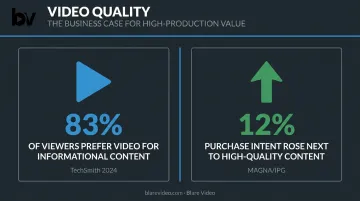
TechSmith's 2024 Video Viewer Trends Report found that 83% of people prefer video for instructional and informational content — but poor audio is a primary reason viewers stop watching. A well-executed post-production workflow is what separates a video that holds attention from one that loses it in the first 30 seconds.
That gap — between what clients expect and what post-production actually involves — is what this guide addresses. Whether you're commissioning your first corporate video or managing a recurring production schedule, understanding each phase helps you set realistic timelines, ask better questions, and avoid the mistakes that cost time and budget.
Key Takeaways
- Post-production is a multi-phase workflow — not a single editing step
- Audio and video finishing are interdependent; weak execution in either undermines the whole
- The sequence follows: rough cut → picture lock → audio finishing + color grade → final mix → export
- A polished two-minute corporate video typically takes 2–4 weeks in post
- "We can fix it in post" has real limits — post-production refines strong source material, but it can't salvage poor footage or bad audio
What Is the Audio & Video Post-Production Workflow?
Post-production is the structured series of stages that transforms raw footage and recorded audio into a finished, distribution-ready video. It begins where filming ends and covers everything from first assembly through final export.
What the workflow includes:
On the video side:
- Rough cut assembly and picture editing
- Color correction and creative grading
- Motion graphics, titles, and lower thirds
- Visual effects and transitions
On the audio side:
- Dialogue editing and noise cleanup
- ADR (dialogue replacement) when needed
- Sound design and ambient layering
- Music integration, mixing, and mastering
Post-production is distinct from production (filming and recording) and pre-production (planning, scripting, and scheduling). Production captures the raw material. Pre-production plans it. Post-production is where pacing, clarity, tone, and technical quality are shaped into the final story.
For corporate video, commercials, and event coverage, post-production accounts for a substantial portion of total production cost. One industry cost guide, drawing on Clutch agency data, puts post-production at 25–35% of total video production spend — a share that reflects just how much craft goes into this phase.
Why Post-Production Defines the Final Quality of Any Video
Strong footage can still produce a weak final video. What happens in post-production — the editing, color, audio mixing, and delivery — is what actually determines whether that footage lands with an audience.
Poor Audio Damages Credibility More Than Poor Visuals
Audio problems are more damaging to viewer experience than most visual issues. A peer-reviewed study published in Science Communication found that audio quality directly affects how listeners judge the speaker's credibility and competence. Yale researchers confirmed a related effect in 2025, finding that tinny or degraded audio in video conferences negatively influences how audiences assess the speaker.
For corporate video — where a spokesperson's perceived authority matters — a noisy lavalier track or harsh room echo can undercut an otherwise strong message.
What Goes Wrong Without a Proper Workflow
Common quality failures in corporate and commercial video without structured post-production:
- Inconsistent audio levels between interview cuts and B-roll
- Color temperature mismatches between indoor and outdoor scenes
- Unprocessed background noise — HVAC hum, traffic, mic handling sounds
- Missing graphics — lower thirds, titles, or branded end cards never added
- Wrong export settings — deliverables that look degraded or get rejected by platforms
These aren't minor aesthetic issues. They signal a lack of professionalism to the viewer immediately, regardless of how strong the content itself is.
Brand Perception Is at Stake
A MAGNA and IPG Media Lab study found that purchase intent rose 12% when ads appeared next to content perceived as high quality. Quality isn't just about what you produce — it's about how that production fits the environment where it's seen. A corporate ad with inconsistent loudness or off-brand color feels out of place in a premium context, even if viewers can't articulate exactly why.
A disciplined post-production workflow is what closes the gap between footage that was shot well and video that performs well.
How the Audio & Video Post-Production Workflow Works
Post-production follows a defined sequence. Skipping or rushing any stage creates problems that compound downstream.
The core flow:
- Production hands off raw footage and audio files
- Editor assembles a rough cut from all usable material
- Picture is locked — no further structural changes after this point
- Audio finishing and color grading run simultaneously by separate specialists
- Final mix is reviewed and approved
- Deliverables are exported in platform-specific formats
Video Editing and Assembly
The editor receives all raw footage, organizes it by scene or sequence, and builds a rough cut based on the approved script or storyboard. This stage is iterative — the rough cut gets refined through internal review, pacing adjustments, and structural decisions until picture lock is reached.
Picture lock is a critical milestone. Once locked, no further cuts, reorders, or scene additions are made. Audio and color work proceed from this fixed version. Changes after picture lock force rework in both departments, adding cost and time.
Blare Video's post-production team begins this process with all supporting materials in hand — scripts, editing notes, storyboards, music selections, and graphics — before a single cut is made. Footage shot at 4K or higher is transcoded to 1080 HD proxy files for efficient editing, then finished in the original resolution.
Audio Dialogue Editing and Cleanup
Once footage is assembled, dialogue editing begins. The audio editor:
- Strips and organizes production audio track by track
- Removes unwanted noise: HVAC hum, mic bumps, ambient interference, handling noise
- Applies equalization to shape vocal clarity and consistency
- Smooths transitions between takes so cuts don't pop or click
This phase builds the clean foundation that mixing will later rely on. Skipping it means a mixer is balancing unclean tracks — which limits how good the final result can sound.
Sound Design, Foley, and ADR
Three related but distinct audio processes fill out the sonic environment:
- Sound design adds ambient atmosphere, spot effects, and non-diegetic audio layers that support mood and narrative
- Foley recreates physical sounds (footsteps, cloth movement, object handling) recorded in sync with picture in a controlled studio
- ADR (Automated Dialogue Replacement) has the speaker re-record unusable lines in a studio — used when on-set audio is unrecoverable
For most corporate video projects — testimonials, brand films, event highlights — full Foley sessions aren't required. But dialogue cleanup and ambient layering are standard, and ADR is sometimes necessary when interview environments weren't controlled during production.
Color Grading and Visual Finishing
The colorist's job is two-part: first, correct the footage (exposure, white balance, consistency across cameras and shooting conditions); second, apply a creative look that aligns with the brand's visual identity.
Cameras like the RED Epic, which Blare Video uses, record in RAW formats that give colorists maximum latitude to shape the image. Footage shot in flat or log profiles holds more detail in highlights and shadows than standard camera profiles — which means more flexibility in grading, but also more work.
Visual finishing runs alongside grading and covers everything that completes the frame:
- Lower thirds and name titles
- Motion graphics and branded elements
- Transitions and visual effects
- Title cards and end screens
Audio Mixing, Mastering, and Final Export
Mixing balances all audio layers — dialogue, music, sound effects — so no element dominates or disappears. The goal is a mix where dialogue is always intelligible, music supports without competing, and effects feel integrated rather than added on top.
Mastering sets the final loudness level to meet platform-specific standards. Each platform enforces different targets, and delivering outside spec gets your audio auto-normalized in ways you can't control:
| Destination | Loudness Standard |
|---|---|
| US broadcast TV commercials | ATSC A/85 (CALM Act compliance) |
| European broadcast | EBU R 128 (-23 LUFS) |
| LinkedIn Connected TV ads | -23 integrated LUFS |
| YouTube / Vimeo uploads | No published LUFS target — platform normalizes on upload |
Final export is not one file. A single corporate video project might require separate deliverables for broadcast, LinkedIn feed, LinkedIn CTV, YouTube, and internal use — each with different codec, resolution, aspect ratio, and loudness requirements. LinkedIn feed video, for example, accepts 4:5, 9:16, 16:9, and 1:1 aspect ratios, while LinkedIn Connected TV requires 16:9 at 1920×1080 with H.264 encoding. Each destination requires its own master — not a single file reformatted after the fact.
Key Factors That Affect the Post-Production Workflow
Production Quality Sets the Ceiling
What was captured on set determines how much post-production can accomplish. Footage shot in RAW gives colorists real grading latitude. Dialogue recorded with isolated tracks and proper room tone gives audio editors clean material to work with. Disorganized media — unlabeled files, missing takes, no script supervisor notes — can add hours to the assembly phase before creative work even starts.
ProVideo Coalition notes that noise reduction must be applied carefully — over-processing can make an audio track unusable. And for color, blown-out highlights contain no recoverable data. Post-production can refine, but it can't manufacture information that wasn't captured.
Project Scope and Deliverable Count
A two-minute single-camera interview and a multi-camera event highlight reel are entirely different post-production scopes:
- Single-camera interview: one edit timeline, one color source, straightforward audio track
- Multi-camera event reel: audio sync across cameras, color matching between camera models, multiple platform-specific cuts for broadcast, LinkedIn, and social — each requiring separate technical treatment
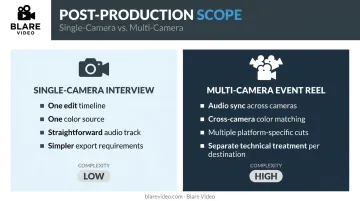
Budget and timeline should reflect deliverable count, not just video length.
Revision Cycles
Unstructured feedback rounds are among the most common causes of post-production overruns. Filestage's creative collaboration research found the average creative review process takes eight days and over three versions to reach sign-off, with waiting for feedback identified as the top bottleneck.
Blare Video addresses this with a defined approval structure and Wipster, a collaborative review platform where clients can place time-coded comments directly on the video. Standard projects include two rounds of revision. Each open-ended feedback round that lacks a single decision-maker adds time without adding quality.
Production-to-Post Continuity
Revision overruns often trace back to a deeper problem: the post team arriving without context. When the same team handles production and post-production, editors arrive knowing which takes were preferred, where audio challenges occurred, and what alternate angles exist — cutting diagnosis time before the first cut is even made.
Blare Video structures production and post as a continuous workflow, not a handoff between separate teams. Director and script supervisor notes travel with the footage into the editing queue, so editors have full context from day one.
Common Misconceptions About Post-Production Workflows
"We Can Fix It in Post"
This assumption consistently leads to poor outcomes and budget overruns. Every major post-production tool has a ceiling:
- Noise reduction degrades into artifacts when pushed past its limits
- Color correction can't recover blown highlights or crushed shadows
- ADR works, but re-recorded dialogue rarely sounds as natural as the original environment
Post-production is a refinement process. Its quality ceiling is set during production, not during editing.
Post-Production Is Fast
A polished two-minute corporate video typically requires significantly more post-production time than the shoot itself. Industry estimates from multiple production companies tell a consistent story:
- Beverly Boy Productions: ~2 hours of post per finished minute for simple edits; up to 10:1 for complex multi-location projects
- VMG Studios: approximately two weeks for a standard two-minute marketing video
- Think Branded Media: 12–18 days for corporate brand films, plus 5–7 days for revisions
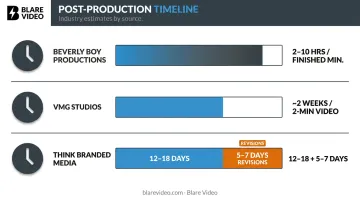
A one-day executive interview shoot can easily generate a week or more of post work. That's before you account for social cutdowns, captions, lower thirds, music licensing, color, audio cleanup, and stakeholder review rounds.
A Rough Cut Is Almost Done
Many clients see a rough cut and assume the project is nearly finished. It isn't. A rough cut is a structural assembly — it shows timing and content flow, but it still lacks:
- Color grade
- Final audio mix and mastering
- Motion graphics and lower thirds
- Platform-specific exports
Calling a rough cut "90% done" is like calling a building frame "90% of a house." The structure is there, but the work that makes it livable hasn't happened yet.
Frequently Asked Questions
What is post-production in video?
Post-production is the phase after filming where raw footage and audio are edited, color graded, mixed, and prepared for delivery. The footage captured on set is just raw material — post is where it becomes a finished, watchable product.
What is a post-production workflow?
A post-production workflow is the structured sequence of steps — from rough cut to final export — that moves raw assets to a finished deliverable. It defines what happens, in what order, and who owns each phase.
What is a typical commercial post-production timeline?
A simple 30-second spot typically takes 1–3 weeks in post. A polished 2–5 minute corporate brand video usually requires 2–4 weeks, depending on revision rounds, deliverable count, and complexity. Multi-platform campaigns with multiple format exports take longer.
What is post-production sound design?
Sound design is the creative process of building an audio environment beyond dialogue — atmospheric layers, spot sound effects, and Foley — to support the emotional and narrative intent of the video. A well-designed soundscape makes the difference between a scene that feels flat and one that pulls the audience in.
What are the 5 elements of sound in audio post-production?
The five core elements are dialogue, Foley, sound effects, music, and ambient/atmospheric sound. Each contributes a distinct layer: dialogue carries the message, Foley grounds the physical world, effects add specificity, music shapes emotion, and ambience fills the sonic space around all of them.
What is the job description of audio post-production?
Audio post-production professionals edit and repair dialogue, manage ADR and Foley sessions, design sound effects, and mix all tracks into a balanced whole. They also deliver mastered files that meet each platform's technical specs — from broadcast loudness standards to codec requirements for social media.