Introduction
A corporate event recap video is a short, professionally edited video — typically 1–3 minutes — that captures the key moments, energy, and takeaways from a business event. The execution is where most companies get tripped up.
The gap between a forgettable recap and a compelling one comes down to three things: how well you planned before the cameras rolled, what your crew actually captured on the day, and how the footage gets edited and distributed. Most organizations underestimate the planning piece — and it shows.
This guide walks through the full process: defining your story before the event, building a shot list, filming the right footage, editing for impact, distributing strategically, and the mistakes that derail otherwise solid productions.
Key Takeaways
- A corporate event recap video is a 1–3 minute highlight reel that extends your event's ROI long after attendees go home
- Pre-event planning (story, audience, shot list) determines what you capture — and what you miss
- Five shot types to prioritize: venue establishing shots, speaker close-ups, audience reactions, B-roll details, and attendee testimonials
- Tight editing, licensed music, and consistent branding are non-negotiable in post-production
- Distribute within 24–72 hours via email, LinkedIn, and your website while audience enthusiasm is still high
What Is a Corporate Event Recap Video and Why Does It Matter
A corporate event recap video summarizes the highlights of a business event — conferences, product launches, annual summits, trade shows, company retreats — in a tightly edited, narrative-driven format. It serves both the people who attended and those who couldn't make it.
The business case is straightforward. Corporate events are expensive. According to Bizzabo's 2025 State of Events report, 39% of B2B event organizers managed total event budgets of $1M or more in 2024 — and 70% reported difficulty proving event ROI. A well-produced recap video turns a one-day investment into a content asset that keeps working: social media posts, email follow-ups, website landing pages, sponsor presentations, and promotion for next year's event.
A recap video is not the same as a raw recording of proceedings. The difference comes down to intent:
- Raw recording captures everything — full sessions, dead air, technical transitions
- Recap video curates — best moments selected, music added, branded graphics included, narrative arc built
Viewers will watch a tight 2-3 minute recap to completion. They won't sit through six hours of unedited footage.
Pre-Event Planning: Before the Cameras Roll
What you decide before the event determines what story is even possible to tell in the edit. Most weak recap videos aren't a post-production problem — they're a pre-production one.
Define Your Story and Target Audience
Start with the video's purpose. The answer shapes every decision that follows:
- Social proof for prospects → prioritize attendee testimonials and crowd energy
- Highlights for past attendees → lead with speaker moments and key announcements
- Teaser for next year's event → focus on atmosphere, excitement, and FOMO-inducing moments
- Internal stakeholder report → emphasize outcomes, attendance scale, and speaker credentials
Your target audience — prospects, current customers, internal leadership, industry press — also determines tone, length, and distribution channel. A 90-second LinkedIn video lands differently than a 3-minute email embed to past attendees.
Build a Shot List and Brief Your Crew
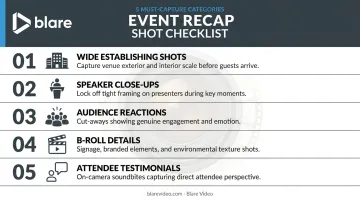
A shot list isn't optional — it's the production document that prevents critical moments from getting missed. Must-capture shots for any corporate event recap:
- Wide establishing shots of the venue and crowd arrival
- Close-up speaker footage: gestures, expressions, key moments at the podium
- Audience reaction shots: applause, engagement, laughter
- B-roll details: signage, branding, product displays, behind-the-scenes setup
- Short, unscripted attendee testimonials captured during breaks
The decision between a professional crew and in-house staff matters at scale. For large-format or high-stakes events, a dedicated event videography company brings crew coordination, equipment redundancy, and post-production workflow that in-house teams typically can't replicate.
Blare Video, for example, conducts pre-shoot briefing calls with every client — even on basic bookings — to ensure the crew, client, and producer are aligned before doors open. They've covered events for clients including LeanData, Google, and TikTok across markets nationwide.
Coordinate Logistics on the Day
- Confirm crew arrival well before doors open — setup time matters
- Scout the venue in advance for lighting conditions, reverb issues, and optimal camera positions
- Identify interview locations with clean backgrounds and manageable ambient noise
Blare Video includes location scouting as part of their pre-production services, alongside timeline creation, permitting, and scheduling — delivering a full production timeline to clients before shoot day so there are no surprises on-site.
How to Film a Corporate Event Recap Video
Even with a solid plan, the shoot day requires capturing a specific mix of footage types. Editors can only work with what they receive.
Key Shot Types to Capture
The five categories every event recap crew needs to cover:
- Wide establishing shots — venue exterior, registration area, crowd scale
- Speaker close-ups — tight framing that captures expressions and energy, not just talking-head wide shots
- Audience reactions — applause, nodding, laughter; these shots make the event feel alive
- B-roll details — event signage, brand elements, product displays, catering, candid networking moments
- Attendee testimonials — 15–30 second unscripted reactions filmed during breaks; these are often the most persuasive element in the final cut
Shoot with the edit in mind. Vary focal lengths throughout the day — mix wide establishing frames with tight close-ups and vary shot duration. Giving the editor options is the difference between a dynamic cut and a monotonous one.
For multi-camera events, Blare Video deploys crews ranging from a standard three-person team (Director of Photography, Camera Operator, Audio Technician) to full-scale productions with multiple camera setups and live switching capability.
Capturing Quality Audio
Audio quality matters as much as visuals. Poor audio on an interview clip undermines the entire production — viewers will stop watching regardless of how good the footage looks.
A reliable audio kit for event recap shoots:
- Shotgun microphone for ambient capture and speaker sound at distance
- Lavalier/lapel mic for any planned interviews
- Audio mixer/recorder for larger productions with a dedicated audio technician
- Avoid camera-mounted mics in large event spaces — reverb and ambient noise will make speaker audio unusable
Post-Production: Editing Your Corporate Event Recap Video
The editing phase transforms raw footage into something worth watching. One principle guides all of it: ruthless brevity.
Structuring the Narrative
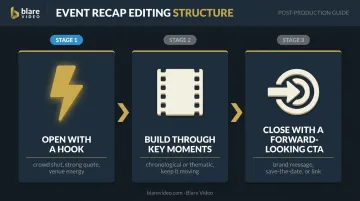
A proven narrative arc for event recaps:
- Open with a hook — a crowd shot, a strong speaker quote, or the energy of the venue before a keynote
- Build through key moments — chronological or thematic, but keep it moving; cut anything that doesn't advance the story
- Close with a forward-looking CTA — a brand message, a save-the-date, or a link to learn more
Vidyard's Video in Business Benchmark Report shows 65% of viewers watch business videos under one minute through to the end, compared to just 20% for videos over 20 minutes. Keep your recap to 90 seconds–2 minutes if possible. Unused footage works as short social clips or teaser content for the next event.
Branding, Text Overlays, and Music
Every corporate recap video should include:
- Logo placement in the opening and closing frames
- Lower thirds with speaker names and titles
- Brand-color title cards for section breaks or key stats
- Licensed music throughout — not optional
Music sets the emotional tone of the entire video. High-energy tracks suit product launches and company-wide kickoffs; warm, aspirational music works better for team retreats or milestone celebrations.
Whatever you choose, it must be licensed for commercial use. Platforms like Musicbed provide sync licenses specifically for brand and corporate video use, ensuring you meet the legal requirement to pair music with commercial visuals.
A full-service production partner like Blare Video handles all of this in post — lower thirds, logo animation, color correction, and music sync — so nothing gets missed before delivery.
The Call to Action
A recap video without a CTA is a missed opportunity. End with something specific:
- Register for next year's event
- Visit the website for session recaps
- Share using the event hashtag
- Follow the brand on social media
The CTA takes five seconds of screen time. That's a small investment for a direct path from viewer to your next conversion.
How to Distribute Your Corporate Event Recap Video
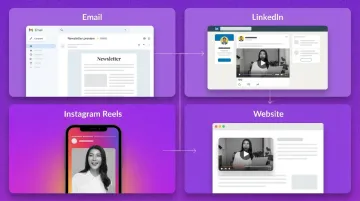
Timing matters. Publishing while audience excitement is still high — ideally within 24–72 hours of the event's close — captures the window when attendees are still sharing and talking about the experience.
Core Distribution Channels
| Channel | Format | Notes |
|---|---|---|
| Email to attendees | Embedded or linked | "Thank you" follow-up with recap link |
| 16:9 landscape | Strong for B2B reach; tag speakers for organic amplification | |
| Instagram/TikTok | 9:16 vertical | Requires a separate recut; don't just upload the landscape master |
| Website/blog | Embedded in post-event page | Supports SEO; pairs well with written event recap |
Tag speakers, featured attendees, and sponsors in social posts. This expands organic reach without paid promotion.
Your Recap Video Keeps Working After the Event
A strong recap video keeps working long after the initial post. It continues to serve as:
- Promotional content for next year's event registration
- Social proof in sales decks and sponsor presentations
- Internal communications content for team updates
- Website content for the event page year-round
Blare Video delivers optimized exports for each platform — horizontal, square, and vertical cuts — shot in 4K or higher to allow reframing without quality loss. One shoot day can cover every format your distribution plan requires.
Common Mistakes to Avoid
Most event recap videos fail for the same predictable reasons. Avoid these four:
- No pre-event planning: Showing up without a shot list or briefed crew produces generic footage. Editors can't build a narrative from a disorganized collection of clips — and no amount of post-production fixes that.
- Running too long: Recap videos over three minutes see significantly reduced watch time and shareability. Resist the urge to include everything. Cut to what matters.
- Relying on camera-mounted audio: Built-in microphones in large, reverberant event spaces produce muddy, echoey audio. It's one of the most damaging technical failures in event video production — if viewers can't hear the interviews clearly, they won't finish watching.
- Ending without a CTA: A video that closes on a logo and silence leaves engagement on the table. Give viewers somewhere to go next.
Frequently Asked Questions
What is a corporate event recap video?
A corporate event recap video is a short, professionally edited highlight reel — typically 1–3 minutes — summarizing the key moments, speakers, and atmosphere of a business event. It's designed to extend the event's reach and ROI across digital channels long after the event ends.
How long should a corporate event recap video be?
Most high-performing recaps run 90 seconds to 2 minutes — long enough to tell a compelling story, short enough to hold attention through the end. Anything beyond 3 minutes risks significant drop-off unless the content is exceptionally strong.
What are the 4 stages of video production?
The four stages are: pre-production (planning, shot lists, scripting), production (filming the event), post-production (editing, music, graphics, color correction), and distribution (publishing and promoting the final video).
How much does a corporate event recap video cost?
Costs depend on crew size, shoot days, and post-production complexity. Full-service professional productions typically range from $10,000 to $50,000+, while single-operator event shoots run considerably less. Blare Video's single-operator packages start around $1,500–$1,850 for production, with post-production beginning at $2,800 for a two-minute cut.
What is a professional way to say "recap" after an event?
Common professional alternatives include post-event highlights video, event summary video, conference highlight reel, and event documentation video. "Highlight reel" works for casual audiences; "event documentation video" fits formal corporate settings.
When should you publish a corporate event recap video?
Aim to publish within 24–72 hours of the event's close to capture peak audience engagement. For major multi-day events, a polished full-length version can follow within a week, provided a shorter social cut goes out immediately.