Introduction
Poor video quality costs organizations more than just embarrassment—it costs real business impact. Research shows that 71% of B2B ads fail entirely because they rely on tired formulas of voiceovers, heavy text, and logos instead of compelling human stories. Meanwhile, 93% of marketers report strong ROI from video marketing, demonstrating the gap between execution and opportunity.
Companies invest significant time and budget into corporate events, yet most fail to capture lasting value from them. Between venue costs, speaker fees, and attendee travel, a single corporate conference can represent a six-figure investment. Without professional event video production, that value evaporates the moment attendees leave the room.
A well-produced video changes that equation, turning a one-day event into a year-long content library. The seven tips below show you exactly how to make that happen.
Key Takeaways
- Plan pre-production weeks ahead to prevent costly on-site improvisation
- Use multi-camera setups — studies suggest they generate significantly more views than single-camera recordings
- Prioritize audio quality — it shapes perceived speaker credibility more than visuals do
- Lead with people-focused storytelling and testimonials to drive stronger purchase intent
- Invest in post-production to turn raw footage into polished, shareable marketing assets
Pre-Production Tips: Setting the Stage Before Cameras Roll
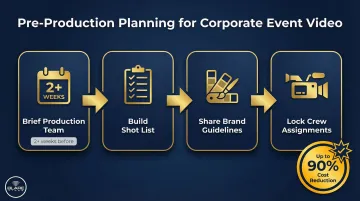
The most common mistake in corporate event video is treating it as an afterthought. Planning must start weeks in advance, not the morning of the event. Without pre-production strategy, even the best crew will miss critical moments, misalign with your brand, and deliver footage that sits unused on a hard drive.
Research proves this matters financially: 77% of brands admitted to reshooting video content because original files were lost or mismanaged, wasting tens of thousands of dollars. Thorough pre-production planning can cut total project costs by up to 90% by ensuring you nail the vision in one shoot. Two pre-production steps make the biggest difference: building a shot list and locking in brand alignment before cameras roll.
Tip 1: Build a Detailed Shot List Before Event Day
A shot list is a detailed document that maps every essential moment your crew needs to capture. It aligns the video team with the event's run-of-show and prevents the common scenario where keynote openings, award presentations, audience reactions, or branding signage go unrecorded.
How to create an effective shot list:
Start by working backward from the intended use of the video. Each use case demands different coverage priorities:
- Social highlight reels need high-energy moments, applause reactions, keynote soundbites, networking interactions, and venue establishing shots
- Internal recaps require executive messaging, employee reactions, team-building moments, and departmental recognition segments
- Sponsor deliverables call for logo captures, booth activity, brand integrations, executive mentions, and attendee engagement with sponsor materials
Collaborate with your production team at least two weeks before the event. Share the full event agenda, speaker list, floor plan, and any must-have moments (awards, product reveals, special announcements). The crew can then map camera positions, lighting setups, and crew assignments to ensure nothing critical is missed.
Tip 2: Align the Video with Your Corporate Brand Guidelines
Every visual and audio element in your event video should reflect your company's brand identity. Color palette, typography in lower thirds, music tone, voiceover style, and graphic treatments all need to align — production companies default to their own templates when clients don't provide direction.
Practical steps for brand alignment:
Share comprehensive brand materials with your production team during the pre-event briefing:
- Complete brand guidelines (logo usage, color codes, typography)
- Past brand videos that demonstrate your desired tone
- Creative direction documents outlining messaging priorities
- Sample lower-third treatments and graphic styles
Brand-consistent event videos move through approval faster and get distributed more widely internally, compressing post-production timelines. The earlier you share these materials, the less revision time you'll spend after the shoot.
On-Site Filming Tips: Capturing What Actually Makes the Video Great
Even the best pre-production plan doesn't account for everything. What separates a forgettable recording from one people actually watch is how your crew captures energy, atmosphere, and unscripted human moments in real time.
Tip 3: Go Beyond the Stage — Capture the Full Event Experience
The most engaging corporate event videos are not recordings of presentations. They layer in venue establishing shots, crowd energy, networking moments, interactive demos, signage, and candid exchanges that convey the scale and atmosphere of the event.
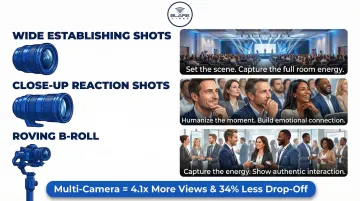
A multi-camera setup delivers measurable results—generating 4.1x more views and reducing viewer drop-off by 34% compared to single-camera static shots.
Essential coverage angles:
- Wide establishing shots — Capture full room scale, audience size, stage design, and venue branding
- Close-up reaction shots — Document genuine attendee responses, laughter, engagement, and emotional moments
- Roving B-roll — Film networking conversations, booth interactions, product demonstrations, and behind-the-scenes setup activity
Behind-the-scenes footage humanizes your company and adds texture to the final edit. Showing speaker prep, crew setup, or team collaboration moments gives viewers a fuller sense of the event's energy and production value.
Tip 4: Lead with People-Focused Storytelling and On-Camera Testimonials
Audiences connect with faces and voices, not logos and slide decks. The most shareable corporate event videos center on real people, genuine reactions, and authentic conversations. Research confirms that 79% of consumers are convinced to buy after watching a video testimonial.
Identify two or three speakers, clients, or attendees in advance and brief them on what to speak to. This lets your crew capture usable soundbites without disrupting event flow. Set up a dedicated interview space with controlled lighting and audio where subjects can give thoughtful responses.
Candid moments carry just as much weight. A handshake, a laugh, or a team reacting to an announcement often lands harder than anything scripted. Instruct your crew to keep rolling between formal segments — these unscripted interactions frequently become the most compelling content in your final edit.
Tip 5: Don't Underestimate Audio Quality and Professional Equipment
Poor audio is the single fastest way to undermine an otherwise beautiful corporate event video. Research shows that poor audio quality causes listeners to judge speakers as less intelligent and less credible, dropping perceived credibility by 19% and retention by 30%.
Essential audio setup components:
- Lavalier mics for speakers — Ensure clean, isolated audio capture from presenters without venue noise interference
- Boom mics for ambient audio — Capture room tone, applause, and audience reactions that add atmosphere
- Direct audio feeds from the event AV board — Integrate with venue infrastructure for pristine speaker audio and presentation sound
Professional crews coordinate with venue AV teams before the event to test connections, prevent feedback loops, and ensure reliable audio integration.
Equipment matters in challenging environments:
Professional-grade cameras like the RED Epic used by Blare Video deliver significant visual advantages in low-light ballroom environments and high-contrast stage settings common in corporate events. These cameras offer HDR capabilities that handle the dramatic lighting differences between a dark audience and a brightly lit stage, conditions where consumer cameras either blow out the stage or lose the audience entirely in shadow.
Post-Event Tips: Turning Footage into Lasting Value
Filming is only half the job. What happens in the edit suite and in your distribution plan determines whether the video becomes a real business asset or sits forgotten on a hard drive.
Tip 6: Invest in Expert Post-Production — Editing, Sound, and Color
Professional post-production covers a range of technical and creative work:
- Timeline editing for narrative pacing and story structure
- Color grading for visual consistency across footage
- Audio mixing and licensed music
- Lower-third graphics identifying speakers
- Intro/outro brand treatment aligned with company identity
Establish clear deliverable formats before editing begins:
- Cut a 2-minute social highlight reel with fast-paced edits, key moments, and brand messaging
- Produce a 10-minute full recap covering keynote excerpts, attendee testimonials, and event atmosphere
- Edit a 30-second teaser to build anticipation for next year's event
- Prepare a vertical 60-second version optimized for Reels and Shorts
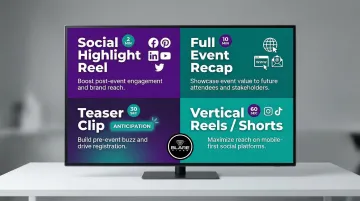
Each format requires a different edit structure from the same footage. Discuss deliverable priorities during pre-production so your editor knows how to organize and prioritize material.
Caption every video before it goes live:
Subtitles and captions are essential for accessibility and silent autoplay viewing. 80% of LinkedIn video views happen with the sound off, and caption use in B2B videos has increased 572% since 2021. Videos without captions lose the majority of social media viewers before the first ten seconds.
Tip 7: Repurpose Event Video Across Marketing Channels for Maximum ROI
Well-captioned, accessible video is also easier to repurpose — and repurposing is where event footage generates compounding returns. A single well-filmed event can produce a full content library: highlight reels, individual speaker clips, testimonial cutdowns, behind-the-scenes shorts, and social-ready vertical edits, each optimized for different platforms and audiences.
The scale of that return is documented. Repurposed clips from a single webinar generated 800,000+ views and over 1,500 hours of watch time — 8.5x more than the live event itself. Another case study showed a systematic repurposing strategy transformed a $2,000 webinar into 52 distinct content pieces generating $180,000 in revenue for an ROI of 1185%.
Specific repurposing strategies:
- Use event recap videos to build anticipation for next year's event
- Embed testimonial clips on product pages and case study sections of your website
- Distribute speaker session recordings internally for training or onboarding
- Create short LinkedIn thought leadership posts featuring executive soundbites
- Edit vertical Reels and Shorts for Instagram and TikTok engagement
Brief your crew on repurposing needs during pre-production:
Tell your crew upfront which formats you'll need. Vertical framing for Reels, clean isolated speaker segments for LinkedIn, and varied B-roll all require intentional capture decisions on the day — not fixes in the edit.
Frequently Asked Questions
What is the process of corporate video production?
Corporate video production follows four stages: pre-production (planning, scripting, shot lists), production (on-site filming), post-production (editing, color grading, audio mixing), and distribution (platform optimization and delivery). Skipping or rushing any phase typically shows up in the final product.
What are some videography techniques used in corporate event videos?
Key techniques include multi-camera setups for dynamic coverage, dedicated B-roll capture for visual variety, lavalier mic integration for clean audio, cinematic framing for a polished, professional look, and candid documentary-style shooting to capture authentic energy and engagement.
What is the 3:2:1 rule in video editing?
The 3:2:1 rule balances footage types across a video: 3 parts B-roll, 2 parts interview or speaker footage, and 1 part branded or graphic elements. Following this ratio prevents any single footage type from dominating the edit, keeping viewers engaged from start to finish.
How long should a corporate event video be?
Recommended lengths vary by use case. Social highlight reels perform best at 60–90 seconds, event recap videos for email or web typically run 2–5 minutes, and on-demand session recordings or training content can run 10+ minutes. Match the length to where your audience will watch it and what you want them to do next.
How much does corporate event video production cost?
Day rates for a professional crew typically range from $1,500 to $5,000+, depending on crew size, shoot duration, equipment tier, number of deliverables, and post-production scope. For an accurate number, request an itemized quote based on your specific event format and content goals.