Introduction
Picture this: a corporate video shoot wraps on Friday. By Monday, the production team is drowning. Raw footage is split across two hard drives, the 30-second cut lives in someone's Dropbox, the client-approved logo is buried in a three-week-old email thread, and nobody can find the b-roll from the morning session.
This isn't a rare scenario. It's standard operating procedure for teams without a proper asset management system.
According to a Canto survey of 500 marketing professionals, 33.4% spend roughly three weeks per year searching for digital files—and 15% spend up to six weeks. For video teams producing multiple campaigns simultaneously, that loss compounds fast.
This guide is for marketing teams, in-house video producers, and corporate content departments managing growing video libraries. DAM is talked about often but implemented well far less frequently—particularly in video workflows, where file sizes are larger, version control is messier, and the cost of disorganization is higher.
Key Takeaways
- DAM for video is a centralized system for storing, finding, and distributing all video-related files across their full lifecycle
- Generic cloud storage (Google Drive, Dropbox) lacks the metadata, version control, and rights management video production demands
- A dedicated video DAM reduces search time, protects brand consistency, and maximizes footage reuse
- Key features to prioritize: metadata tagging, version control, access permissions, and NLE integrations
- Software alone isn't enough—naming conventions and governance determine whether DAM actually works
What Is Digital Asset Management for Video Production?
Digital Asset Management (DAM) is the process—and the software supporting it—of organizing, storing, retrieving, and distributing digital files across their entire lifecycle, from creation through archiving.
In video production specifically, that lifecycle covers a lot of ground:
- Raw camera footage (from cards or SSDs)
- Proxy files for editing
- Audio stems and music tracks
- Motion graphics and title sequences
- Multiple edited cuts and version iterations
- Final deliverables in various formats and aspect ratios
How DAM Differs from Generic File Storage
Video assets aren't just large—they're structurally complex. A single corporate shoot generates footage in formats like MOV, MP4, MXF, or ProRes. Each format may require codec-specific handling, and each project generates multiple cut versions, revision rounds, and deliverable variants. At that scale, a shared folder stops being a system and starts being a liability.
As Cloudinary defines it, a DAM provides tagging, rights management, permissions, version control, and granular search. Cloud file storage offers none of these.
DAM vs. MAM vs. CMS
These three systems are frequently confused:
| System | Primary Function | Best For |
|---|---|---|
| DAM | Organize, store, and distribute multimedia assets | Corporate video teams, marketing departments |
| MAM | Frame-level production, high-bitrate broadcast workflows | Broadcast networks, post-production houses |
| CMS | Create and publish web content | Website management, blog publishing |
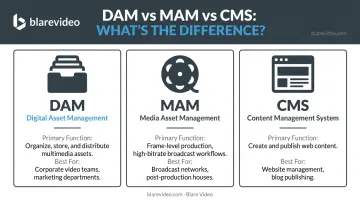
TechTarget's comparison notes that MAM focuses on high-bitrate video and complex production-heavy tasks, while DAM handles broader multimedia asset organization. For most corporate video teams, a DAM with video-specific features handles most production needs.
Why Video Production Teams Need a DAM System
The Operational Cost of Chaos
The search-time problem isn't just annoying—it's expensive. When a team can't locate the approved 15-second cut, they either delay the campaign or recreate assets that already exist somewhere on a hard drive.
Corporate video production amplifies this problem. A single campaign might generate a broadcast master, a 30-second cut, a 15-second version, square and vertical social formats, and client-specific variations—each of which needs to be findable, distinguishable, and version-controlled.
Without structure, teams work from outdated files, duplicate footage they can't find, and distribute assets that were never approved.
Brand Consistency and Compliance Risk
For corporate clients in regulated industries—financial services, healthcare, legal—this isn't just an efficiency issue. Using expired talent releases, off-brand assets, or unlicensed music in distributed content creates real liability.
DAM systems with rights management address this directly. Key protections include:
- Tracking content expiration dates and sending renewal notifications
- Blocking expired or unapproved materials from reaching distribution
- Maintaining audit trails for licensed music, talent releases, and brand assets
For healthcare and life sciences clients in particular, the stakes are concrete—FDA violations can run $10,000 to $20,000 per occurrence.
The ROI Case
Those compliance risks are the floor. Beyond avoiding liability, a well-implemented DAM system generates measurable returns. A Forrester Total Economic Impact study commissioned by Brandfolder found that organizations using DAM reported:
- 273% ROI over three years
- 90% reduction in time spent searching for creative assets
- 40% productivity improvement
- $1.13M in total three-year benefits
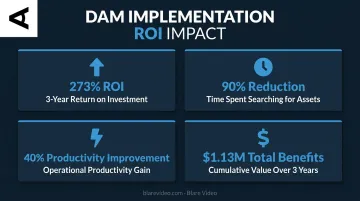
For teams managing high-volume corporate campaigns—where a single project might produce a dozen format variations—those productivity gains compound quickly across every production cycle.
How DAM Works Across the Video Production Workflow
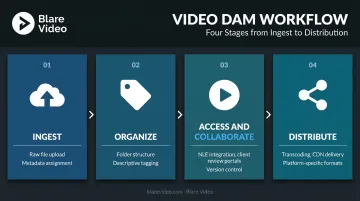
A video DAM functions in four stages: ingest, organize, access, and distribute. Each stage builds on the last—and quality at ingest determines searchability for everything that follows.
Ingest and Upload
Raw files from production—camera cards, audio recordings, graphics files—are uploaded to the DAM immediately after a shoot. Proper ingest means assigning foundational metadata at upload:
- Project name and client
- Shoot date and location
- Camera format and resolution
- Intended usage or campaign
Some systems support automated ingest from connected storage devices. Blare Video's workflow, for example, involves backing up footage on set before transcoding—creating 1080 HD proxy files from 4K or higher camera originals to facilitate editing without sacrificing the source files. This approach keeps source files intact while giving editors lighter proxies to work with immediately.
Organize and Tag
Assets are organized into a logical folder structure (by project, client, date, or content type) and tagged with descriptive metadata. For video, this includes:
- Subject matter and shot type
- Format, resolution, and codec
- Talent names and usage rights
- Version status (rough cut, approved, archived)
AI-powered auto-tagging dramatically accelerates this for large libraries. Bynder's Speech-to-Text generates transcripts for video and audio in over 100 languages. Canto's Smart Tags can detect objects and scenes in video, with configurable confidence thresholds and up to 30 tags per video. These tools turn hours of manual tagging into minutes.
Access, Review, and Collaborate
This is where the day-to-day production value of a DAM becomes obvious:
- Editors pull proxy files directly into their NLE (Premiere, Final Cut) without digging through network drives
- Creative directors review and annotate cuts within the platform
- Clients access a secure shared portal for approvals—no email chains, no version confusion
Version control is the critical mechanism here. The DAM surfaces the most current approved cut and archives previous iterations. Nobody accidentally works from v3 when v7 has been signed off.
The quality of incoming deliverables matters here too. Final assets delivered with clear format specs, multiple cut versions, and confirmed usage rights let the DAM library start clean. Retroactive tagging of disorganized handoffs is one of the most common reasons DAM implementations stall.
Distribute and Publish
Approved assets move to distribution: secure client download links, social platforms, broadcast, or website embedding. Each destination typically requires a different format, which is where transcoding comes in.
DAM systems with built-in transcoding and CDN capabilities handle this automatically:
- Convert a ProRes master to H.264 for web delivery
- Resize and reformat for platform-specific social versions
- Stream via HLS or MPEG-DASH without playback lag
Cloudinary's documentation confirms support for MP4, WebM, MOV, MXF, HLS, and MPEG-DASH with CDN delivery—meaning files reach their destination at full quality, instantly.
Key Features to Look For in a Video DAM System
Not all DAM platforms handle video equally. These are the capabilities that separate a purpose-built video DAM from a generic asset library.
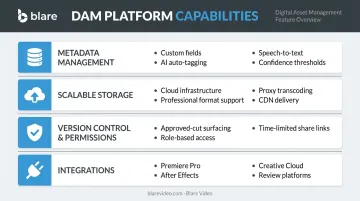
Metadata Management and AI Tagging
Without strong metadata, even the best DAM becomes an unsearchable archive. Look for:
- Custom metadata fields (project name, client, rights expiry, shot type, talent)
- AI-powered auto-tagging for objects, scenes, and faces in video
- Speech-to-text transcription for searchable dialogue and narration
- Configurable confidence thresholds so low-quality auto-tags don't pollute the library
Scalable Storage and Format Support
Video files are far larger than other asset types — a single 4K RAW shoot can dwarf an entire image library. Requirements include:
- Scalable cloud infrastructure that grows with production output
- Support for professional formats (MXF, ProRes, high-bitrate MOV)
- Built-in transcoding to generate proxy files for editing
- CDN delivery for fast, high-quality playback across teams
Version Control and Access Permissions
These two features are frequently skipped during evaluation and frequently regretted afterward:
- Version control ensures non-editor team members only see approved cuts, while older versions remain archived (not deleted)
- Role-based access control separates what editors, clients, executives, and external agencies can see and download
- Time-limited share links with expiration dates and download tracking for external distribution
Integrations with Production and Creative Tools
A DAM is only as useful as its integration into the tools editors already use. Key integrations to verify:
- Canto's Adobe CC Connector lets editors browse assets and save finals back to the DAM without leaving Premiere Pro
- Bynder's Adobe Creative Cloud Connector supports both Premiere Pro and After Effects
- Acquia DAM supports search and sync inside Adobe Creative Cloud, including Premiere Pro and After Effects (verified 2023)
- Collaborative review platform integrations reduce friction between the edit suite and client approval
Common Mistakes and Misconceptions About DAM in Video Production
Mistaking Cloud Storage for Asset Management
Google Drive, Dropbox, and WeTransfer are file-sharing tools. They are not DAMs. The distinction matters because standard cloud file storage lacks the advanced metadata, rights management, and version control that professional video libraries require.
Organized folders feel like asset management — but at scale, they break down fast. Without search, version control, or access governance, a well-named folder structure is just a slower way to lose things.
Implementing Software Without Governance
The most common DAM failure mode: purchasing a platform, skipping the governance work, and watching the system become a digitized version of the same mess it was supposed to solve.
Before onboarding any team, establish:
- Naming conventions — consistent, agreed-upon file names across all projects
- Folder structure — logical hierarchy everyone follows
- Metadata standards — required fields for every uploaded asset
- Upload workflows — who ingests, when, and with what minimum information
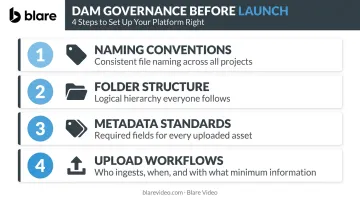
Henry Stewart's 2024 DAM tutorial for professionals centers metadata, taxonomy, and governance as the fundamental skills—not software configuration. The tool enables the process; it doesn't replace it.
That governance gap also explains why DAM fails when it's handed off entirely to IT.
Treating DAM as an IT Initiative
DAM adoption fails when IT owns the implementation without input from editors, producers, and marketing leads. The taxonomy and folder structure must reflect how assets are actually created and used — not how a systems administrator thinks they should be organized.
Editors define what makes footage searchable. Producers know what metadata matters at ingest. Marketing leads understand how assets move to distribution. All three roles should shape the taxonomy before the platform goes live.
Conclusion
A well-implemented video DAM transforms an unmanageable sprawl of footage, cuts, and deliverables into a searchable, secure, version-controlled library. Production accelerates. Brand consistency holds. Footage from last year's campaign becomes a reusable asset rather than an inaccessible file on a forgotten drive.
The software is only part of the equation. Naming conventions, governance, and team-driven taxonomy determine whether the system actually works. The best time to establish all of it is at the start of a production program. Build the structure before the library grows — audit your folder conventions, assign metadata ownership, and pick a platform that matches your actual volume. The teams that do this early spend their time making content, not hunting for it.
For production companies managing ongoing client work across multiple projects and locations, a scalable DAM isn't a luxury — it's what keeps deliverables consistent and timelines intact.
Frequently Asked Questions
What is video asset management?
Video asset management is the process of storing, organizing, searching, and distributing video content within a centralized system. It's a specialized application of DAM designed for the unique complexity of video files—large sizes, multiple formats, and version-heavy production workflows.
What are digital assets in media production?
Digital assets in media production include any file with production value: raw camera footage, edited sequences, audio stems, motion graphics, scripts, storyboards, and final deliverables across multiple format versions. All of these need to be tracked, tagged, and retrievable across the full project lifecycle.
How does a DAM differ from a CMS for video production?
A CMS like WordPress is built for publishing and managing web content. A DAM is built for managing the production library itself—with metadata taxonomy, version control, rights management, and editing tool integrations that no CMS provides.
What is the best way to share video files with clients?
DAM-generated secure share links or client portals are the most controlled method, preferred over WeTransfer or Google Drive. They support permission controls, download tracking, expiration dates, and format-specific delivery without quality loss.
How much does a DAM system cost?
Most enterprise DAM platforms—Canto, Bynder, Brandfolder, MediaValet, and Acquia DAM—require custom quotes rather than publishing public pricing. Costs vary based on library size, user count, and storage needs, so contact vendors directly for accurate figures.
What are the 5 P's of asset management?
The 5 P's (People, Process, Platform, Policy, and Performance) is a framework reminding teams that technology alone doesn't solve asset management. Each element—from who governs the system to how success is measured—must be intentionally defined for DAM to work.