Introduction
Most organizations now produce internal videos regularly. The problem isn't volume — it's that many of those videos get skipped, half-watched, or forgotten within a week. Watch rates stay low, employees keep asking the same questions after announcements, and communication teams wonder why they spent time creating content that didn't land.
According to Gallup, U.S. employee engagement fell to 31% in 2024 — and generic internal content that fails to connect with employees' day-to-day realities isn't helping. Yet the Gallagher State of the Sector report found video is rated effective by 85% of internal communication teams, but only 59% of organizations actually use it. Most teams know video works. Far fewer know how to make it work consistently.
This guide covers the full production cycle: from defining objectives before you film, through production quality decisions, post-production choices that affect completion rates, and measurement that ties video back to real business outcomes — with practical benchmarks at each stage so you can identify exactly where your current process is losing viewers.
Key Takeaways
- Internal videos need a behavioral objective — not just a topic — before production starts
- Pre-production planning drives more impact than camera equipment
- Audio quality is the single biggest technical factor in viewer retention
- Post-production choices — length, captions, and pacing — directly affect completion rates
- Completion rates and downstream behavior matter more than raw view counts
Why Most Internal Communication Videos Fail to Deliver Results
The most common reason internal videos underperform has nothing to do with production quality. It's the absence of a defined behavioral objective.
Videos built around a topic — "we want to inform employees about the new policy" — don't change behavior. Videos built around an action — "we want employees to complete compliance training by Friday" — give every production decision a clear target. That single shift determines whether a video gets treated as a communication tool or a checkbox.
The Three Most Common Production Mistakes
Beyond unclear objectives, most corporate video programs repeat the same errors:
- Over-scripted leadership messages: Executives reading verbatim from a teleprompter deliver information, but not credibility. Employees can tell, and engagement drops.
- Isolated videos without a connected strategy — a single change management video without supporting content before and after leaves employees with unanswered questions.
- Length mistaken for thoroughness: A 12-minute company update that could have been 3 minutes doesn't signal care or depth. It trains employees to ignore future content.
The Real Cost
Low-quality internal video isn't just a communications problem. It creates downstream operational costs:
- Delayed initiative adoption as employees wait for clarification
- Repeated follow-up requests after announcements (emails, manager escalations, Slack threads)
- Employees who learn by habit to skip company videos entirely
Fixing production habits early costs far less than chasing down the fallout from content that didn't land.
Pre-Production: Build Your Strategy Before You Film
Good internal video starts with a behavioral objective, not a camera setup.
The difference looks like this:
| Vague Objective | Behavioral Objective |
|---|---|
| "Inform employees about the new expense policy" | "Employees submit expenses using the new system by January 31" |
| "Share the CEO's update" | "Employees understand the three priorities for Q2 and can name them" |
| "Cover the onboarding process" | "New hires complete their Day 1 checklist before their first team meeting" |
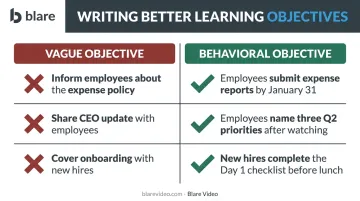
This approach mirrors what Kirkpatrick Partners recommends for training programs: plan backward from the result you want, then determine what behavior must change, then decide what employees need to learn or understand. Video format and length follow from that sequence, not from habit or what's easiest to produce.
Audience and Format Analysis
Mismatched formats drive low completion rates more reliably than almost any other factor. A 10-minute talking-head video sent to warehouse workers checking phones between shifts will lose most of its audience in the first 30 seconds.
Match format to workforce:
- Frontline and mobile workers: Under 2 minutes, subtitle-enabled, mobile-optimized. Accessible without headphones.
- Leadership messages to desk-based employees: 3–5 minute interview-style format with clear structure
- Process or compliance training: Modular series, 5–8 minutes per segment. The Panopto 2024 Workforce Training Report found optimal training video length is 11–15 minutes overall, with enterprise organizations preferring 6–10 minute segments — shorter and searchable wins.
Scripting follows the same logic. Full scripts produce robotic delivery; pure improvisation produces unclear messaging. The effective middle ground is a structured outline — key messages locked, conversational delivery left flexible. One core idea per video, not three.
When to Use a Professional Production Partner
Not every internal video requires professional production. But some categories carry enough organizational weight that poor execution creates real credibility damage.
High-stakes videos where professional production adds measurable value:
- CEO and executive communications during major transitions
- Company-wide onboarding welcome videos
- Change management announcements
- Compliance and regulatory training distributed nationally
For these, production quality directly influences whether the message lands. Professional lighting, clean audio, and experienced on-camera direction make leadership look prepared and confident — not stiff.
Blare Video provides full-service corporate video production across major US markets — Los Angeles, New York, Chicago, Atlanta, and beyond — covering everything from pre-production scripting through final delivery. For organizations producing executive communications or compliance training at scale, that end-to-end coverage removes the coordination burden from internal teams.
That said, not everything needs a production crew. Internal teams handle team updates, quick process walkthroughs, department announcements, and event recaps effectively — these are contexts where authenticity outweighs polish.
Production Quality: The Elements That Make Internal Videos Work
Audio First
Audio quality is the most important technical variable in internal video retention. TechSmith's 2024 Video Viewer Trends Report found that 35% of viewers say high-quality, easy-to-hear narration keeps them engaged — and poor audio tied with blurry footage as the top reason viewers stop watching.
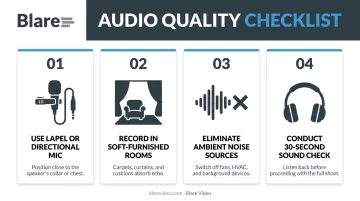
Practical fixes that cost little:
- Use a lapel or directional microphone instead of a built-in camera mic
- Record in rooms with soft furnishings (carpets, upholstered chairs) to reduce echo
- Eliminate ambient noise: close windows, unplug desk fans, silence notifications
- Do a 30-second sound check before filming — listen back through headphones
Lighting Without a Film Crew
Lighting is the second biggest quality factor, and it's more achievable than most internal teams assume.
The standard approach is three-point lighting — key light (main illumination), fill light (reduces harsh shadows), and backlight (separates the subject from the background). You don't need a full studio kit to approximate this.
Practical shortcuts:
- Position subjects near a large window for natural key light
- Add a reflector or secondary LED panel opposite the window for fill
- Avoid filming with overhead fluorescents as the only light source — they create unflattering downward shadows
- Affordable LED panel lights ($80–$200) produce even, controllable light across multiple shoots
Camera and On-Camera Performance
Camera quality matters less than most teams assume. A current smartphone or entry-level mirrorless camera produces adequate footage for most internal video types — provided audio and lighting are handled. Proper framing counts for more than sensor size: keep eyeline in the upper third of the frame, use a clean background, and maintain appropriate distance from the lens.
Cinema-grade equipment — like RED cameras — becomes relevant for CEO communications, national onboarding content, or anything distributed at broadcast quality. Blare Video's production packages range from two-person crew setups for corporate interviews to full RED cinematic packages for high-stakes organizational content.
Equipment, however, only gets you so far. On-camera performance coaching for executives and subject matter experts is often the most overlooked production element. Key guidance:
- Look at the lens, not at yourself on the monitor
- Speak to one person, not a crowd
- Use pauses deliberately — silence reads as confidence on camera
- Rehearse key messages without memorizing exact phrasing
Post-Production: Optimize for Clarity, Retention, and Accessibility
Video Length and Retention
The first 15–20 seconds determine whether an employee continues watching. Wistia's engagement research confirms that a steep drop in the opening moments signals the introduction isn't delivering on its promise fast enough. Front-load the value — tell employees what they're getting and why it matters to them, immediately.
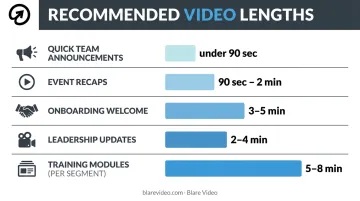
Recommended length by video type:
| Video Type | Recommended Length |
|---|---|
| Leadership updates | 2–4 minutes |
| Training modules (per segment) | 5–8 minutes |
| Onboarding welcome | 3–5 minutes |
| Event recaps | 90 seconds–2 minutes |
| Quick team announcements | Under 90 seconds |
Editing for Engagement
Editing decisions that affect completion:
- Cut on action — eliminate dead air, filler words ("um," "so"), and long pauses between sentences
- Use on-screen text to reinforce key messages, not just decorate the frame
- Insert b-roll every 20–30 seconds during talking-head segments to maintain visual engagement
- Open with the most important information, not with preamble or agenda slides
Accessibility as a Baseline Requirement
Captions are not optional for organizations with distributed or multilingual workforces. They support employees with hearing impairments, workers watching in open offices without audio, and non-native speakers.
WCAG 2.1 standards require captions for prerecorded synchronized media. Treating them as a production standard rather than an afterthought protects compliance and improves reach at the same time.
One important note: auto-generated captions contain errors, particularly with accents, industry terminology, and background noise. Review and edit captions before publishing. The few minutes this takes prevents credibility problems when employees notice errors like misspelled product names or garbled technical terms.
Thumbnail and Title Optimization
Captions and editing affect how employees experience a video — but thumbnails and titles determine whether they click in the first place. Employees browsing an intranet or video library make that decision in seconds. A specific, benefit-driven title does more work than a generic label:
- ❌ "Finance Update — November"
- ✅ "New Expense Policy: What Changes on January 1"
Use a thumbnail that shows a clear, recognizable subject — not a blurry mid-blink frame. This is a two-minute fix that noticeably increases views on on-demand content.
Distribution and Measurement: Closing the Loop
Multi-Channel Distribution
The right distribution channel depends on where your audience actually spends their time. Gallagher's State of the Sector report found employee app usage surged 48% while traditional intranet portals declined 46% — a clear signal about where mobile and frontline workers are reachable.
Match channel to segment:
- Desk workers: Intranet, email embed, video platform links
- Frontline workers: Employee app, SMS with video link, digital signage in common areas
- Global teams: Distribute through localized channels, with captions and translations enabled
The same video rarely works identically across all channels. A 4-minute leadership message works in email; it needs a 60-second version for digital signage.
Metrics That Matter
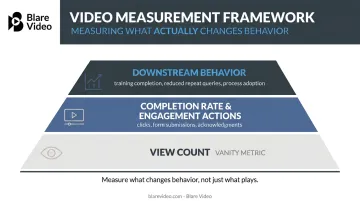
View count is a vanity metric. Completing a video and acting on its content are two different things.
Measure instead:
- Completion rate: what percentage of viewers watched through to the end
- Engagement actions: clicks on linked resources, form submissions, policy acknowledgments
- Downstream behavior: training completion rates, reduction in repeat queries, process adoption
Panopto's research found that organizations assess training video effectiveness through feedback surveys (80%), completion data (60%), assessments (57%), and performance metrics (51%). The same framework applies to internal communication video.
Building the Feedback Loop
Low completion rate signals a video is too long or the wrong format. Low open rate points to a distribution channel mismatch. Neither problem is fixed by producing more content: both require adjusting the production or distribution approach upstream.
A simple monthly review of performance data — completion rate, open rate, downstream action rate — creates compounding improvement over time. Teams that build this habit improve their next video based on real evidence, not assumptions.
Frequently Asked Questions
Which element is key to communicating effectively in video production?
Clear audio is the most critical technical element — poor sound causes viewers to stop watching faster than any other quality issue. Strategically, a defined behavioral objective matters most: knowing what specific action or understanding you want to drive determines whether a video communicates effectively or simply plays.
How can AI help with video production?
AI supports internal video production through auto-generated captions and translations, script drafting assistance, and video summary generation for longer content. Analytics tools powered by AI can also surface engagement drop-off points, showing exactly where viewers stop watching — always review auto-generated captions before publishing, since accuracy varies with audio quality and speaker accents.
What are the 7 C's of corporate communication?
The 7 C's are: Clear, Concise, Concrete, Correct, Coherent, Complete, and Courteous. Used as a scripting checklist before production, they help teams identify messaging that's vague, padded, or likely to confuse employees before anything gets recorded.
What are the four types of internal communication?
The four types are downward (leadership to employees), upward (employees to leadership), horizontal/lateral (between peers or departments), and diagonal (cross-functional). Each calls for a different video format — leadership messages serve downward communication, while employee spotlight content supports upward and lateral channels.
What are the 10 steps to improve internal communication?
The core steps are: define objectives, know your audience, select the right channel, maintain consistent messaging, use video and visuals, encourage two-way feedback, measure effectiveness, iterate on data, train communicators, and align content with company culture. The pre-production and measurement sections of this guide cover how these apply specifically to video.