A well-produced highlight video changes that equation entirely. It extends the event's reach, engages people who weren't there, and gives you a reusable content asset that works for months afterward.
This article covers what a corporate event highlight video actually is, the main formats with real-world examples, what to include, and how to get maximum use from the final product.
Key Takeaways
- A corporate event highlight video is a 2–3 minute curated edit — not a recording — designed to tell a story
- Formats include recap reels, speaker highlights, attendee testimonials, BTS content, and social media cut-downs
- Strong videos open with scene-setting shots, hit 3–5 key moments per minute, and close with a branded CTA
- Publish within 24–72 hours while audience momentum is high
- One highlight video can generate 6–12 months of content across social, email, and sponsorship channels
What Is a Corporate Event Highlight Video?
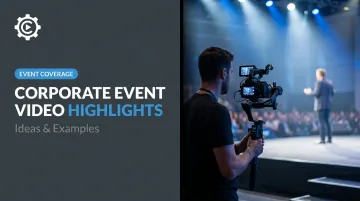
A corporate event highlight video is a 2–3 minute distillation of the most impactful moments from a business event. Conferences, product launches, award ceremonies, trade shows, team summits — the format applies across all of them. The goal is to tell a story, not replay the agenda.
A highlight video isn't a recording. Where a recording documents, a highlight video curates — selecting moments for their emotional resonance and weaving them into a narrative arc with music, pacing, and intentional sequencing. That curation is what separates a forgettable recap from something people actually share.
Cvent's event recap guidance describes the format well: keep it 2 minutes or less, include keynote clips, panel moments, audience reactions, and networking footage, pair visuals with music, and overlay key event stats. That's the working blueprint.
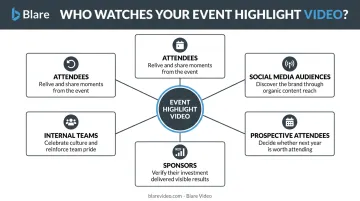
The audiences a highlight video can serve span a wide range:
- Attendees who want to relive and share the experience
- Prospective attendees evaluating whether next year's event is worth their time
- Sponsors who need proof of exposure and event quality
- Internal teams who couldn't attend or want the energy captured for culture content
- Social media audiences discovering the brand for the first time
Types of Corporate Event Video Highlights: Ideas and Examples
"Highlight video" isn't a single format. The right approach depends on your event type, audience, and where the video will live. Here are the five main formats, each with distinct use cases.
Recap and Event Highlights Reel
The most common format: a fast-paced, music-driven edit that captures keynote moments, audience reactions, and networking energy — usually released within a few days of the event.
TED's public "A Taste of TED" trailer is a useful benchmark. The 4-minute highlight blends speaker clips, audience interaction, and behind-the-scenes glimpses into a complete preview of the TED conference experience, closing with a clear invitation to engage further. What makes it work is restraint: it doesn't try to document everything, just enough to make you want more.
For brands producing their own version, the same principle applies. Show the energy, not the full agenda.
Speaker Highlight Reel
Speaker reels splice together the strongest quotes, most impactful moments, and audience reactions from keynote speakers or panelists. They serve double duty: post-event recap content and promotional material for future editions.
Shopify Unite 2021's highlight video, published on the ShopifyDevs channel, is a clean example. At 2:12, it follows the event sequence, covers product announcements and developer-facing updates, and closes with a CTA pointing back to Shopify's ecosystem.
The visual style is straightforward, with no elaborate production flourishes. That keeps focus on the content itself. For B2B brands with substantial product news, this understated approach performs better than high-production spectacle.
Attendee Testimonial Highlight
Instead of centering on stage moments, this format builds the narrative around attendee voices. Short on-camera interviews, captured on the day, are woven into event footage to create a social-proof-driven recap.
HubSpot's INBOUND conference has used this approach across multiple years. Official recap videos on the HubSpot YouTube channel reference keynotes, networking, breakouts, and the overall attendee experience. Real participant voices validate event value in ways a polished brand video simply can't replicate.
For sponsors, this format also provides direct evidence of attendee engagement, which matters when renewing a sponsorship commitment.
Behind-the-Scenes Highlight
BTS content documents the preparation, logistics, and human moments leading up to and during an event. It's an authentic counterpart to the polished main reel.
This format works well for brands wanting to showcase culture and team effort. Blare Video has captured this kind of content for clients by deploying cameras early, covering setup, speaker prep, and the operational moments that give a large event its texture. The result humanizes the organization behind the event in ways that stage-front footage rarely does.
Social Media Cut-Down Highlight
A 30–60 second vertical or square format version of the main reel, optimized for Instagram Reels, TikTok, or LinkedIn. The goal is to drive traffic back to the full video or event registration page.
The data supports prioritizing this format alongside the main video:
- According to LinkedIn's 2025 B2B video analysis, video posts are shared 20x more than any other content type on the platform
- HubSpot's research finds 42% of marketers identify 21–30 seconds as optimal for short-form video
- LinkedIn cut-downs for awareness content should stay under 30 seconds
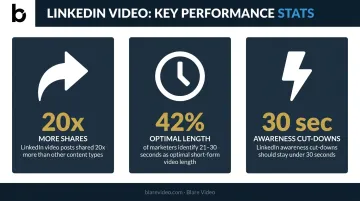
That sharing multiplier alone justifies the extra editing pass to produce a platform-native version.
What Should You Include in a Corporate Event Highlight Video?
Think of this as both a checklist and a creative brief. These are the elements that separate a forgettable recap from something people actually share.
Opening and Scene-Setting Shots
The first 10–15 seconds are your only chance to establish context before a viewer decides to keep watching. Wide venue shots, arriving guests, branded signage, and energy-building B-roll do the work here — all before a single speaker clip appears.
This matters more than most people expect. Wistia's research shows videos under 1 minute average 52% engagement, and the opening seconds are where you either earn continued attention or lose it.
Key Moments and Speaker Excerpts
Not every moment deserves to be in the edit. Quality beats quantity here. Good selection criteria:
- A powerful quote that captures the event's theme
- A product reveal and the room's reaction to it
- An award presentation with a genuine emotional response
- A pivotal panel exchange that generated visible audience engagement
Target 3–5 moments per minute of video. More than that and the pacing becomes exhausting; fewer and the video feels thin.
Candid Reactions and Crowd Footage
Reaction shots — laughter, applause, visible surprise, a standing ovation — are often the most emotionally resonant clips in any highlight reel. They make viewers feel what it was like to be in the room, and unlike scripted footage, they can't be manufactured in post.
Attendee and Speaker Soundbites
Crowd reactions capture emotion, but on-camera interviews add the verbal context that footage alone can't provide. When Blare Video produced coverage for the AAE2024 conference at the Los Angeles Convention Center, the team set up a dedicated interview space alongside main event coverage — capturing concise attendee testimonials that fed directly into the post-event video deliverables.
Branded Elements and Closing CTA
Consistent branding throughout the video — logo placement, color palette, lower-third graphics — ensures the video works as a brand asset, not just a record of an event. Blare's post-production team handles custom lower-thirds, logo animations, and intro/outro sequences as standard deliverables.
End with a specific CTA:
- URL for next year's event registration
- Company or event website
- Social media handle
- Contact page for sponsor inquiries
Registration links and sponsor contact pages tend to drive the most measurable post-event ROI — prioritize those if you can only include one.
Production Tips That Make Corporate Event Highlight Videos Stand Out
Edit for Emotion, Not Chronology
The most effective highlight videos don't follow the event's running order. Editors select clips for emotional impact and arrange them to build momentum — fast cuts during high-energy moments, slower pacing for reflective scenes.
Blare Video's editorial approach reflects this directly: the team focuses on selecting "the most impactful scenes that would resonate with the audience" rather than reconstructing the event chronologically. The result is a narrative that captures what the event felt like, not just what happened.
Use Music Strategically
Music selection sets the entire tone before a single word is spoken. A few general principles:
- Upbeat and driving — product launches, team celebrations, tech conferences
- Understated and cinematic — formal summits, award evenings, executive roundtables
- Mid-tempo with a clear beat — general corporate conferences where you want energy without hype
Blare Video handles music licensing and acquisition as part of its production workflow, with custom music composition available when licensed tracks don't fit the brief. Syncing edits to musical beats (cuts landing on downbeats, transitions hitting a key change) creates a subconscious sense of professionalism that viewers register even if they can't name it.
Blend Natural Sound with the Soundtrack
Don't replace ambient sound entirely with music. Layering crowd applause, a speaker's key line, or genuine laughter beneath the music track preserves authenticity and immerses viewers in the live atmosphere. A crowd cheer surfacing through the music at the right moment lands harder than music alone.
Plan Your Shot List Before the Event
The best highlight videos are planned before a single frame is captured. Knowing in advance which moments to prioritize ensures editors have the footage they need. Key moments worth locking in before production day:
- Opening address and keynote speakers
- Product reveals or major announcements
- Networking and candid attendee moments
- Award presentations
- Closing remarks and audience reactions
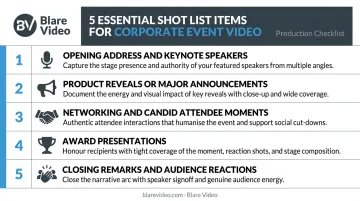
Working with a production company that arrives with a structured shot list makes this practical. Blare Video deploys crews across 23 US markets with a pre-production process covering strategic consultation, location logistics, and coverage planning — so the final edit isn't constrained by gaps in the footage.
How to Maximize the ROI of Your Corporate Event Highlight Video
A highlight video isn't a one-time asset. With the right distribution plan, it fuels a 6–12 month content cycle.
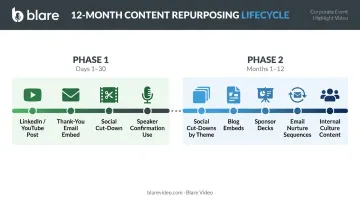
Immediate Use (Days 1–30)
Speed matters here. Cvent recommends publishing event recaps within 2 days while momentum is fresh; Bizzabo puts post-event follow-up at 3 days maximum.
Immediate deployment checklist:
- Post the full video on LinkedIn, YouTube, and your event landing page within 24–48 hours
- Embed in post-event thank-you emails to attendees and sponsors
- Push the social media cut-down on Instagram Reels and LinkedIn simultaneously
- Add to the speaker confirmation emails for next year's event early
Blare Video has delivered same-day social media clips from events — footage transferred mid-event, edited on-site, and exported immediately after wrap. That turnaround keeps content live while the event is still trending.
Long-Term Repurposing (Months 1–12)
Raw event footage has a longer shelf life than most marketing teams use. Options include:
- Social cut-downs broken out by speaker or theme for LinkedIn campaigns
- Blog post embeds paired with written session summaries
- Sponsor decks showing event reach, engagement, and brand exposure
- Email nurture sequences building to next year's event registration
- Internal culture content for onboarding or team communications
Blare Video stores raw footage in long-term LTO storage after delivery, so clients can return months later to pull additional cuts or build new campaigns from the original material.
Using It to Promote Future Events
Last year's highlight video is the most persuasive promotional asset for next year's event. Prospective attendees and sponsors want to see proof — the energy in the room, the quality of speakers, the scale of the audience. A well-produced highlight reel shows all of that in under three minutes.
Wyzowl's 2026 video marketing data makes the case plainly: 82% of marketers report good ROI from video. For event marketing, a highlight video does the work of brochures, testimonials, and case studies in a single shareable asset.
Frequently Asked Questions
What should you include in a corporate event highlight video?
Include opening scene-setting shots, 3–5 key moments per video minute (speaker excerpts, product reveals, audience reactions), brief attendee soundbites, and a branded CTA at the close. Consistent lower-thirds and logo placement throughout ties it together as a brand asset.
What does a corporate event highlight video look like?
Strong examples include TED's event trailers (broad atmosphere), Shopify Unite developer reels (speaker and product focus), and HubSpot's INBOUND recaps (attendee experience). Each approach serves a different goal, but all three prioritize narrative over documentation.
How long should a corporate event highlight video be?
Most corporate highlight videos run 2–3 minutes for full distribution. A separate 30–60 second version optimized for LinkedIn, Instagram Reels, or TikTok should be produced at the same time from the same footage.
How soon after an event should a highlight video be published?
Within 24–72 hours is the target window. Event buzz diminishes quickly, so fast-turnaround editing — including on-site editing capability — should be a key factor when selecting a production partner.
Can a corporate event highlight video be repurposed for marketing?
Yes. The same footage can be recut for social media, embedded in email campaigns, used in sponsor decks, and recycled as event promotion content for up to 12 months after the original date.
How do I choose a videographer for a corporate event highlight video?
Look for a production company with a specific corporate event portfolio, multi-camera capability, and a fast post-production turnaround. The ability to edit for narrative — not just documentation — is what separates a highlight video from a recording.