Introduction
Most corporate teams discover the same thing eventually: a 90-second animated explainer outperforms a five-slide deck every time. Slide decks don't hold attention in a LinkedIn feed, and screengrab walkthroughs rarely explain complex software as well as a well-crafted animated sequence.
According to Wyzowl's 2026 Video Marketing Statistics report, 91% of businesses now use video as a marketing tool — and 68% have created explainer videos, the format where motion graphics do their heaviest lifting. That adoption isn't accidental. It reflects how well animation handles the things live footage can't: abstract concepts, invisible processes, and data that needs to move.
This guide covers what motion graphics corporate videos actually are, the main types and use cases with real examples, five best practices worth following in 2026, and a planning framework for your next project.
Key Takeaways
- Motion graphics use animated design elements — text, icons, shapes, charts — to communicate business messages without requiring live-action footage
- 96% of people have watched an explainer video to learn about a product; video outperforms text and static infographics for product learning
- Core use cases: explainer videos, brand storytelling, data visualization, and internal training
- 2026 best practices: keep top-of-funnel content under 90 seconds, design for sound-off viewing, treat typography as a visual element, not a subtitle layer
- Full-service partners — scripting through final delivery — reduce revision cycles and protect brand consistency
What Are Motion Graphics Corporate Videos?
Motion graphics corporate videos use animated graphic design elements — shapes, text, icons, data visualizations, logos — to deliver a business message. They sit between static design and full-scale character animation — no actors, no storylines, just designed elements moving with intent.
Why Companies Choose Motion Graphics Over Live Action
For many communication goals, motion graphics simply work better:
- No location costs — no crew, no permits, no weather delays
- Easier to update — change a policy, update a stat, swap a logo without reshooting
- Visualize the invisible — data flows, software architecture, internal processes, and security systems can't be filmed; they can be animated
- Platform-ready — the same asset can be reformatted for LinkedIn, YouTube, internal intranets, and trade show screens
63% of consumers prefer short video for learning about a product, compared to 12% for text-based articles and just 7% for static infographics. That gap helps explain why motion graphics have become the go-to format for product education in both B2B and B2C — they meet audiences where attention actually lives.
Types of Motion Graphics Used in Corporate Videos
The Four Core Formats
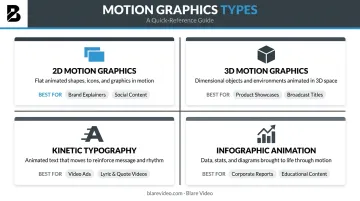
| Type | What It Is | Best For |
|---|---|---|
| 2D Motion Graphics | Flat animated shapes, icons, and text | Explainers, SaaS walkthroughs, broad audiences |
| 3D Motion Graphics | Depth-based CGI animation | Product demos, hardware, premium positioning |
| Kinetic Typography | Animated text as the primary visual element | Short-form social, sound-off feeds, exec quotes |
| Infographic Animation | Animated charts, timelines, and data sequences | Investor communications, metrics storytelling |
Mixed Media: The Hybrid Approach
Layering motion graphics over live-action footage has become the go-to format for brand videos, testimonials, and case studies. A human face builds trust; animated callouts, data overlays, and branded transitions add clarity without replacing that human element.
Common hybrid applications include:
- Testimonial videos with animated stat callouts and lower-thirds
- Case study videos with overlaid timeline graphics
- Product demos combining on-camera presenters with screen overlays
- Executive interviews with branded data sequences in post
Style Signals Brand Personality
Animation style communicates who you are before a word is spoken:
- Flat 2D design reads as approachable, simple, and accessible
- Glossy 3D signals technical sophistication and premium positioning
- Hand-drawn or illustrated styles convey warmth, creativity, and personality
Mismatched style actively undermines the message. An enterprise security platform using bouncy, playful 2D animation sends the wrong signal to a CISO evaluating vendors.
Motion Graphics Corporate Video Examples by Use Case
The most useful way to look at examples is by communication goal, not by visual style. Here's how different organizations use motion graphics across four core use cases.
Explainer and Product Demo Videos
Technology companies rely on 2D motion graphics to visualize software workflows that live footage simply can't show. How does data move between modules? How does a dashboard process inputs in real time? How does a threat detection system identify anomalies? You can't point a camera at any of that.
The approach that works: abstract the interface into basic visual primitives (shapes, icons, flow lines) rather than showing literal product screens. This removes the confusion of learning a new interface and focuses the viewer on the benefit, not the feature.
Google has used this effectively, applying geometric shapes and smooth transitions to illustrate collaboration scenarios that feel cinematic rather than like a screengrab tutorial.
Blare Video's portfolio includes product explainer video work that applies this same logic — visualizing what a product does rather than simply showing what it looks like.
Brand Storytelling and Mission Videos
Abstract company values — innovation, community, sustainability — can't be filmed directly. Motion graphics give brands a way to visualize them.
The most effective brand storytelling videos use a journey metaphor: a visual narrative arc that moves from a problem state through transformation to resolution. This structure creates emotional resonance without requiring a documentary crew or celebrity spokesperson.
Blare Video has produced brand-related video content for clients including Google, TikTok, and Williams-Sonoma. That kind of work requires deep familiarity with each client's existing visual identity: not just following trends, but translating a specific brand voice into motion design choices that feel native to it.
Data Visualization and Investor Communications
Financial services firms, healthcare organizations, and tech companies use animated infographics to make data compelling rather than dense. The goal isn't to animate for decoration — it's to use motion to reveal sequence and change over time.
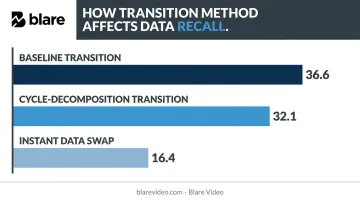
Research supports a specific principle here: the transition method matters. A 2023 Springer study on animated bar charts found that baseline and cycle-decomposition transitions produced recall scores of 36.6 and 32.1 respectively, compared to just 16.4 for instant data swaps. Motion that clarifies how data changes helps viewers remember it. Motion applied as decoration does not.
Blare Video has produced infographic video content and investor communications for clients including HLC Equity and a San Francisco-based real estate investment firm — projects where the video had to make complex financial concepts accessible to non-specialist audiences.
Training, Onboarding, and Internal Communications
Large organizations face a specific problem: getting consistent messaging to dispersed teams without running repeated live shoots. Motion graphics solve this across several dimensions:
- Updatable content: swap out a policy change without scheduling a new production day
- No on-camera talent needed: removes a common barrier for compliance and HR videos
- Scalable format: one video serves dispersed teams across multiple locations consistently
Blare Video has worked on employee-focused video content for Williams-Sonoma and Moss Adams, producing work that needed to reach staff across multiple cities without repeated live shoots.
Best Practices for Motion Graphics Corporate Videos in 2026
Platform behavior has shifted the baseline. Short-form video creation on LinkedIn is growing at twice the rate of other post formats, and Vidyard's 2025 business benchmark found that videos under one minute keep 65% of viewers engaged to the end, while videos over 20 minutes retain just 20%.
Here are five practices that hold up in that environment.
1. Lead with the Problem, Not the Product
Open by visualizing the audience's pain point — use abstract shapes or metaphors to represent the broken state before showing the solution. Viewers who recognize their own situation in the first five seconds keep watching; viewers who see a product logo and tagline upfront rarely do.
2. Keep Top-of-Funnel Content Under 90 Seconds
For awareness and explainer content, 60–90 seconds is the ceiling. Training and demo videos can run 2–3 minutes, but only if pacing stays tight throughout. Completion rate drops sharply at every length milestone — every unnecessary second costs you viewers.
3. Match Motion Style to Brand Personality
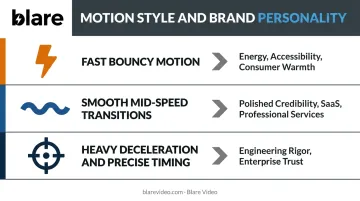
Easing curves, color palette behavior, and typography motion choices must align with brand personality:
- Fast, bouncy motion → energy, accessibility, consumer-facing warmth
- Smooth mid-speed transitions → polished credibility for SaaS and professional services
- Heavy deceleration and precise timing → engineering rigor, enterprise trust
IBM's design language explicitly defines animation as "purposeful and succinct." That standard holds for any enterprise brand: inconsistent motion style across assets erodes recognition faster than most brand teams expect.
4. Treat Typography as a Visual Actor
Kinetic typography earns its place when text physically interacts with the scene: displacing shapes, casting shadows, moving with branded easing curves. Applied as a subtitle layer on top of footage, it's just decoration. Integrated text lets viewers process copy and visuals simultaneously, which measurably improves retention.
5. Design for Sound-Off Viewing
79% of videos in the LinkedIn feed are watched without sound, according to LinkedIn's Video Ads Playbook. Corporate video is also frequently viewed in offices, on mute, mid-meeting. Motion graphics must communicate the core message visually — on-screen text, icon animation, and visual hierarchy doing the work independently of any voiceover.
How to Plan Your Motion Graphics Corporate Video Project
Three decisions determine whether a motion graphics project succeeds before a single frame is animated.
Step 1: Define one goal and one primary audience. Projects that serve multiple objectives become unfocused. Is this video for awareness, education, lead generation, or internal alignment? That single answer determines length, style, distribution channel, and call to action.
Step 2: Match the style to the goal. Use this quick decision framework:
- 2D motion graphics → broad audiences, SaaS products, simple concepts
- 3D motion graphics → premium product showcases, hardware, technical visualization
- Kinetic typography → short-form social, sound-off environments
- Mixed media → trust-building content where human faces add credibility
- Infographic animation → data-heavy presentations, investor communications
Step 3: Choose a production partner with full-service capabilities. Motion graphics projects most often stall when a team handles animation but not scripting, or scripting but not motion design. Each handoff gap adds revision rounds and dilutes the final product.
Blare Video handles motion graphics as part of full-service corporate video production — from scripting and storyboarding through animation, sound, and color. Their clients include Google, TikTok, Moss Adams, and the American Association of Endodontists, spanning technology, financial services, healthcare, and retail.
The team operates across 23 US markets, including Los Angeles, New York, Chicago, Dallas, Atlanta, and Miami. Industry familiarity matters here: a partner who knows how a healthcare brand communicates differently from a SaaS company will cut revision cycles significantly.
Frequently Asked Questions
What is a motion graphics video?
A motion graphics video uses animated graphic design elements — logos, typography, icons, and data visualizations — to communicate a message through movement. Unlike static design, it brings visual elements to life, and is typically paired with voiceover, music, or sound design.
What are the main types of motion graphics?
The four primary types used in corporate video are: 2D motion graphics (flat animated shapes and icons), 3D motion graphics (depth-based CGI), kinetic typography (animated text as the main visual), and infographic animation (animated charts, timelines, and data sequences).
How much does a motion graphics corporate video cost?
Costs vary based on style, length, and complexity. Industry pricing in 2026 shows that a standard 2D animated explainer typically runs $3,000–$15,000, while 3D animation with custom modeling starts around $10,000 and can exceed $50,000 per minute for premium work.
How long should a motion graphics corporate video be?
Aim for 60–90 seconds for top-of-funnel and brand content. Training and product demo videos can run 2–3 minutes. In either case, every 15 seconds should earn its place — a tight 2-minute video consistently outperforms a padded 90-second one.
What is the difference between motion graphics and animation?
Motion graphics animate graphic design elements — shapes, text, icons, and data. Character-driven animation tells stories through characters with expressive movement and narrative arcs. The two often overlap in corporate video, particularly in mixed-media or brand storytelling formats.
Can motion graphics be integrated with live-action footage?
Yes. Mixed media production layers animated elements over live footage to add clarity, emphasis, and brand identity without replacing the human element. It's a practical choice for brand videos, case studies, and testimonials — where on-screen people build trust and animation handles the complex parts.