: Production Guide](https://file-host.link/website/blarevideo-9ny7zz/assets/blog-images/86094a15-bccc-4e99-9be2-a35db1dedb02/1779777296206251_5254807f5c944c85a69db32c99af1bd7/360.webp)
A compelling event highlight reel isn't made by pressing record and trimming it down later. It's won or lost before the camera rolls, through deliberate planning, structured coverage, and disciplined editing that turns scattered moments into a coherent story.
This guide covers what a highlight reel is, how the production process works from start to finish, what to include, and what separates a reel that drives registrations from one that gets skipped after five seconds.
Key Takeaways
- An event highlight reel is a 1–3 minute video distilling the most brand-aligned, emotionally resonant moments from a corporate event.
- Production spans three phases: pre-production (planning, shot listing), live filming, and post-production (editing, sound, delivery).
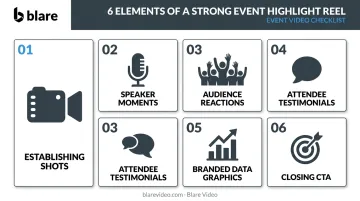
- Must-have elements: establishing shots, speaker moments, audience reactions, testimonials, branded graphics, and a closing CTA.
- Top mistakes to avoid: poor audio capture, skipping a shot list, and mismatching tone to your target audience.
- For investor presentations, sponsorship decks, or high-visibility events, professional production directly affects how your brand is perceived.
What Is an Event Highlight Reel and Why It Matters
An event highlight reel is a short, professionally edited video that distills the most memorable, energetic, and brand-aligned moments of a corporate event into a concise visual narrative.
Three common video formats get confused — here's how they differ:
- Full event recording — documents everything, used for on-demand access or internal archives
- Teaser video — pre-event content designed to build anticipation
- Highlight reel — a post-event marketing asset, curated for storytelling and distribution
For corporate teams, the highlight reel extends the return on an event investment long after the venue clears out. According to Bizzabo's 2026 research, 82% of event organizers now create video-on-demand content from their events, and 53% gate at least some of it for lead generation — treating event video as a demand-generation asset with measurable pipeline value.
That reach extends across more channels than most teams initially plan for:
- Social media promotion for future events
- Sponsor and investor decks
- Recruitment and employer brand content
- Internal communications and leadership updates
- Post-event email campaigns for registrants who couldn't attend
LinkedIn's data shows video generates 30% more comments per impression than static content and earns nearly 3x more watch time. In a crowded feed, that engagement gap is what separates a highlight reel that builds pipeline from one that gets scrolled past.
How the Event Highlight Reel Production Process Works
The production process runs across three phases: strategic planning before the event, structured filming during it, and a multi-stage edit afterward. Each phase depends on the one before it. Skipping pre-production doesn't save time — it creates problems that can't be fixed in the edit.
Pre-Production: Planning and Shot Listing
The decisions made before filming determine what's achievable on the day.
Start by defining the reel's purpose and audience. Is it for social media? A sponsorship deck? Post-event email? Each answer shapes the length, tone, pacing, and graphic treatment. A 90-second LinkedIn cut and a 3-minute investor presentation version are different productions, even if they share source footage.
From there, build the shot list. Map the event schedule and identify every moment worth capturing:
- Keynote openings and speaker introductions
- Award presentations or milestone announcements
- Networking energy and crowd reactions
- Sponsor activations and branded moments
- Attendee testimonial opportunities
At Blare Video, every booking — regardless of size — includes a pre-shoot coordination call between the client, Blare representative, and crew. Everyone aligns on priorities before a single camera goes live. Also handled at this stage are stakeholder briefings, any required venue permissions, and attendee release forms for individuals who will appear on camera.
Production: Filming the Event
Events are live and unrepeatable, which makes the production phase unforgiving — there's no second take on a keynote moment or a spontaneous crowd reaction.
Multi-camera coverage is essential. A professional reel requires at least two camera operators working distinct roles:
- Camera 1 — wide/establishing shots, crowd energy, venue scale
- Camera 2 — close-ups of speakers, audience reactions, detail moments
For larger conferences, three or more operators become necessary. Blare Video's coverage of an AppDynamics conference at the Cosmopolitan in Las Vegas, for example, deployed a four-camera setup to handle simultaneous keynote sessions, breakout rooms, and evening networking events.
Audio is a separate production priority — not an afterthought. The three essential audio inputs for any event reel are:
- Lavalier microphones on primary speakers (placed at breast-pocket level for clean capture)
- A direct feed from the venue's PA/sound board
- Ambient crowd audio captured independently
Poor audio cannot be fixed in post. Music can't substitute for an inaudible testimonial or a muffled keynote excerpt.
Post-Production: Editing, Sound Design, and Delivery
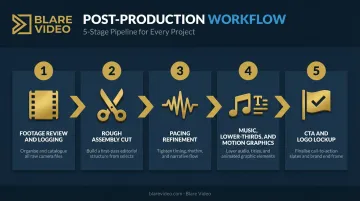
The edit is where raw coverage becomes a story. The workflow, in sequence:
- Footage review and logging — identify hero clips that carry emotion or convey the event's quality
- Rough assembly cut — build the narrative spine
- Pacing refinement — slow motion on high-impact moments, faster cuts for energy sequences
- Music, lower-thirds, and motion graphics — add branded graphics and titles
- CTA and logo lockup — close with purpose
Music selection shapes the emotional register of the entire reel. A track that fits a consumer brand launch will feel completely wrong for an executive-facing conference video.
Every track used must be properly licensed — which means securing both a sync license (to pair music with visuals) and a master use license (to use a specific recording). ASCAP, for instance, only issues public performance licenses and cannot authorize sync or master use. Using unlicensed music exposes organizations to statutory damages ranging from $750 to $150,000 per work under U.S. copyright law. Stock music libraries like Musicbed or Epidemic Sound provide pre-cleared licensing with documented scope.
Blare Video uses Wipster for client review — an online platform that lets clients pause, annotate directly on the timeline, and flag specific frames for revision, which keeps feedback organized and turnaround fast.
What to Include in a Compelling Event Highlight Reel
Strong reels tend to follow a recognizable content sequence:
1. Establishing shots and venue context Wide shots of the full venue, time-lapse of the audience filling in, exterior location footage. These open the reel, provide scale, and establish production quality from the first frame.
2. Speaker and presentation moments Keep clips to the most quotable or visually dynamic 5–10 seconds. The goal is conveying thought leadership and event quality, not summarizing the speech.
3. Audience reactions and crowd energy Close-ups of attendees laughing, applauding, and engaging are among the most persuasive elements in any reel. They confirm the event was worth attending and build anticipation for the next edition.
4. On-camera attendee testimonials Brief, candid quotes filmed during the event (not formal sit-down interviews) add authenticity that branded narration can't replicate. Wyzowl's research found 79% of people had watched a video testimonial to learn about a company or service, and 77% said it helped convince them to buy. For B2B contexts, peer voices carry particular weight.
5. Key data and branded graphics Overlay text with impactful event stats — attendee count, number of speakers, years running. Lower-thirds should use brand-consistent typography and colors. This element is especially important when the reel will be shown to sponsors or investors.
6. A purposeful closing CTA Every reel needs a clear endpoint that matches its distribution goal: "Register for 2026," a website URL, or a brand logo lockup with contact information.
Key Factors That Affect Highlight Reel Quality
These are the variables that separate a forgettable reel from one that actually drives results:
- Footage quality and camera capability — Resolution, dynamic range, and low-light performance determine what's recoverable in post. Cinema-grade cameras (RED, Sony FX9, Canon Cinema line) provide far more flexibility for color grading and cropping than consumer-grade options. Blare Video deploys 4K–8K cameras including Red Epic Dragon and Red Weapon Helium for high-end event productions.
- Pre-event planning depth — The shot list quality is directly proportional to coverage quality on the day. Unplanned filming yields redundant angles and missed key moments.
- Editor experience and storytelling instinct — Technical skill matters, but the ability to read an event's narrative arc and select clips that build emotional momentum is what separates a clean edit from a memorable one.
- Turnaround timeline — Cvent recommends publishing event recaps within two days while the experience is fresh. Blare Video has delivered next-day social content for events like AAE2024 at the Los Angeles Convention Center, exporting two social clips on-site for immediate distribution.
- Intended distribution platform — A reel for LinkedIn requires different pacing and framing than one for a conference website or investor deck. Format decisions — horizontal (16:9), vertical (9:16), or square (1:1) — belong in pre-production, not the edit room.
Common Mistakes and How to Avoid Them
Three mistakes consistently produce weak highlight reels — and all three are preventable with the right pre-production decisions.
Filming for documentation instead of story. Instructing videographers to "capture everything" results in hours of redundant footage with no narrative thread. A highlight reel requires curated, intentional coverage — not a comprehensive recording.
Underinvesting in audio capture. Inaudible testimonials, muffled keynote excerpts, and hollow crowd reactions undermine even the strongest visual edit. Music cannot compensate for poor source audio. Treat audio capture as equal in priority to camera work.
Mismatching style to audience. Fast EDM cuts may feel dynamic in the edit suite but will alienate an executive-facing crowd. Pacing, music, and visual style should be determined by who watches the video and where — not by what looks exciting on a timeline.
When to Handle It In-House vs. Hire a Professional
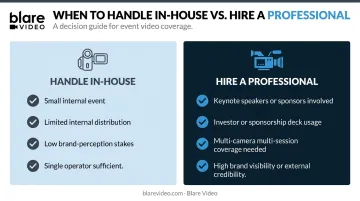
In-house is reasonable when:
- The event is small and internal (team offsite, company milestone)
- Distribution is limited to internal channels
- Stakes for brand perception are low
- A single skilled operator can cover the scope
Professional production is necessary when:
- The event involves keynote speakers, sponsors, or media
- The reel will appear in investor presentations, sponsorship decks, or public social channels
- Multi-camera coverage is required across simultaneous sessions
- The event represents significant brand visibility or external credibility
For events that fall into the second category, Blare Video deploys production crews across major US markets — including Los Angeles, Las Vegas, Chicago, New York, Atlanta, and beyond — handling multi-camera logistics, equipment, and post-production under one engagement. When the reel will represent your brand to sponsors, investors, or a public audience, that coordination matters more than any single piece of gear.
Frequently Asked Questions
What are the processes of video production?
Video production follows three phases: pre-production (planning, scripting, shot listing), production (filming), and post-production (editing, sound design, graphics, delivery). For event highlight reels, pre-production planning carries extra weight because events are live and unrepeatable — there's no opportunity to reshoot a missed moment.
How long should an event highlight reel be?
The typical range is 1.5 to 3 minutes. Shorter cuts (60–90 seconds) work best for social media platforms, while longer versions (2–3 minutes) suit conference websites, investor presentations, or post-event email campaigns. Cvent recommends keeping event recap videos under two minutes to maintain viewer attention.
What is typically included in an event highlight video?
Most highlight reels include these core elements:
- Establishing shots of the venue
- Speaker and keynote moments
- Audience reactions and crowd energy
- Brief attendee testimonials
- Branded lower-thirds with event stats
- Closing call-to-action or logo lockup
The sequence and emphasis depend on the reel's intended purpose and audience.
How many cameras do you need to film an event highlight reel?
A minimum of two cameras is recommended — one for wide shots and crowd energy, one for close-ups of speakers and key moments. Larger or multi-stage events require three or more operators. Blare Video's AppDynamics conference coverage, for example, used a four-camera setup to handle simultaneous sessions across the venue.
How long does it take to edit an event highlight reel?
Professional editing typically takes 2–5 business days depending on event length and footage volume. Teams targeting social media distribution often prioritize a 24–48 hour turnaround to capture peak post-event engagement. Blare Video has delivered social-ready clips on the same day as the event for time-sensitive distributions.
What's the difference between an event highlight reel and a full event recording?
A full event recording documents everything in its entirety, used for on-demand access or internal archives. A highlight reel is a curated, narrative-driven edit designed for marketing, promotion, and audience engagement. Both require distinct production approaches starting from day one of planning.