Introduction
Most video projects don't fall apart on set. They fall apart in post.
The shoot wraps, the crew disperses, and suddenly there's no one driving the timeline. Footage sits waiting for an editor. The colorist doesn't know when to expect the picture lock. The client's legal team needs three days to approve the script revision nobody scheduled. And what was supposed to be a three-week turnaround stretches into six.
The root cause is almost always the same: no post-production schedule, or one that nobody maintained past day two.
This guide is written for producers, project managers, brand marketers, and corporate clients commissioning video content: anyone responsible for getting a project delivered on time and on brief.
Here's what we cover:
- What a post-production schedule is and why it matters
- The five phases every schedule must address
- How to build one, step by step
- The mistakes that reliably blow up otherwise solid projects
Key Takeaways
- A post-production schedule maps every editorial, sound, color, VFX, and delivery task against a calendar with assigned owners, deadlines, and dependencies.
- Post is where raw footage becomes the final deliverable. Without a managed schedule, missed deadlines are almost guaranteed.
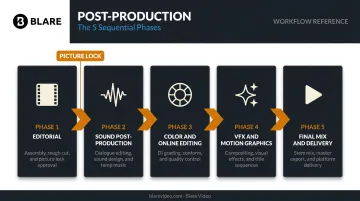
- The five core phases are: Editorial, Sound Post-Production, Color and Online, VFX, and Final Mix and Delivery.
- Build the schedule backward from the delivery date, map parallel workflows, and treat review cycles as formal scheduled tasks.
- The most damaging mistakes: treating picture lock as flexible, underestimating render time, and letting departments run on separate informal schedules.
What Is a Film Post-Production Schedule?
A post-production schedule is the detailed plan that sequences every task, team member, and milestone required to take raw footage from the edit bay to final delivery — with dates, durations, and dependencies clearly mapped out.
Unlike a simple task list, a post-production schedule defines what needs to happen, in what order, by whom, and by when. It also accounts for the fact that some phases run in parallel while others can't start until a previous phase is complete.
How It Differs from a Production Schedule
The production schedule governs the shoot: locations, call times, crew, and equipment. The post-production schedule takes over the moment filming wraps. Where production schedules are largely linear (shoot scene A, then scene B), post-production involves overlapping workflows across editorial, audio, color, VFX, and delivery. All of those departments must be coordinated simultaneously.
According to StudioBinder's post-production overview, post-production is the stage where editing of visual and audio materials begins after filming is wrapped, but in practice the schedule must account for far more than editing. It maps handoffs between departments, tracks approval cycles, and requires active maintenance throughout the process.
A well-run post-production schedule gets updated continuously — revised when a color session runs long, when a VFX shot comes back for a second pass, or when a client review adds a revision round. The first draft is a starting point, not a finished plan.
What a post-production schedule tracks:
- Task ownership across editorial, audio, color, VFX, and delivery teams
- Phase dependencies (what must finish before the next phase can begin)
- Approval cycles and client review windows
- Delivery deadlines for each deliverable format
Why Post-Production Scheduling Matters for Every Video Project
Color, sound, and editing don't happen in isolation — each phase shapes meaning, and each depends on the one before it. Without a schedule governing these dependencies, creative decisions get compressed under deadline pressure not because anyone planned it that way, but because the time simply ran out.
When there's no schedule, specific problems compound quickly:
- Approval bottlenecks pile up with no formal turnaround window
- VFX vendors miss handoff windows because they weren't given enough lead time
- Sound design gets rushed because color and online editing ran long
- The client receives a final cut that hasn't been through a proper QC pass
As Frame.io's workflow guide notes, failing delivery specifications can cause artifacts, sound problems, or playback failure — and "failing QC can be a time consuming and expensive proposition." This is what happens when delivery and QC are treated as assumptions rather than scheduled tasks.
The Corporate Video Reality
For corporate and branded video — commercials, event recaps, testimonials, social content — post-production scheduling is just as critical as it is for feature films, even when the timeline is compressed to one to three weeks. The phases don't change; the windows just get tighter, which means dependencies become less forgiving.
Working with a full-service production company like Blare Video means the post-production schedule is built and managed by professionals who coordinate every phase from footage ingest through final file delivery. For a client commissioning their first corporate video, that structure is what keeps the project on brief and on deadline.
The 5 Phases of Film Post-Production (and How to Schedule Each)
Post-production follows a defined sequence. Each phase depends on the one before it. Understanding that dependency structure is what separates a schedule that holds from one that collapses at picture lock.
Phase 1: Editorial
Editorial is the foundation. The editor works through raw footage to build an assembly cut, then a rough cut, then a fine cut — in collaboration with the director, producer, and client. For corporate and branded projects, Blare Video typically completes a first cut for client review within two to three weeks of editing beginning, though this window extends with footage volume and complexity.
On one project for Episcopal Communities and Services, the team had to review and transcribe five hours of interview footage before condensing it into a three-minute final film. That kind of footage volume changes the editorial math significantly.
The phase ends with picture lock: the formally approved edit that triggers all downstream work.
Two things to understand about picture lock:
- It produces an Edit Decision List (EDL) — a chronological record of every editorial decision that colorists, sound designers, and VFX artists will later reference
- Once locked, changes are not free — Frame.io notes that a five-second offline edit can become "up to an hour or more" of rework across collaborators downstream
Phase 2: Sound Post-Production
Sound encompasses dialogue editing, ADR (Automated Dialogue Replacement for unusable on-set audio), foley, sound design, music, and final mix. Some of this work can begin in parallel with late-stage editorial, but the final mix cannot start until picture is locked.
Sound is consistently underestimated in corporate video scheduling. Blare Video's post-production services include sound design, music composition, and audio mixing — all handled as part of a structured workflow, with client review built in before the final mix is committed.
Build in at least one round of client review on a temp mix. Projects that skip this step routinely arrive at final delivery with audio that feels unpolished — and fixing it at that stage is expensive.
Phase 3: Color Correction and Online Editing
Color correction fixes technical inconsistencies — exposure, white balance, contrast — for visual continuity across shots. Color grading is the creative application of a mood or visual look. Both require a locked picture before meaningful work can begin.
StudioBinder makes the distinction clearly: correction is technical, grading is creative. The schedule needs time for both.
Online editing (the conform process) is where the colorist and online editor reassemble the edit using original high-resolution camera files rather than the proxy files used during offline editing. This step also includes titles, lower thirds, end credits, and caption work. Blare Video uses DaVinci Resolve for color work — industry-standard software for professional grading and finishing.
Phase 4: VFX and Motion Graphics
For corporate and commercial projects, VFX most commonly means:
- Animated lower thirds and branded text treatments
- Logo composites and intro/outro animations
- Kinetic titles and motion graphics overlays
- Product visualization or 2D/3D animation where required
VFX cannot be finalized until picture is locked. Late VFX requests — scoped after editorial is underway — are a reliable source of delivery slippage because vendors need lead time that wasn't built into the schedule.
The Visual Effects Society's 2026 On-Set VFX Data Collection Guide reinforces this: coordination between production and post-production departments should begin before the shoot wraps.
Phase 5: Final Mix and Delivery
The final mix brings all audio elements — dialogue, ADR, sound effects, foley, music, voiceover — into a single cohesive mix with proper levels for the target delivery format. Once the mix and color grade are approved, the project moves into:
- QC (quality control) — technical review against delivery specs
- Mastering — encoding to required formats
- Delivery versions — web MP4, broadcast masters, social cuts, international M&E tracks where needed
Blare Video confirms delivery format at this stage, noting that social and web content typically requires a standard MP4, while broadcast commercials require station-specific specs. YouTube officially recommends MP4 with H.264 video encoding for web delivery. QC and any re-export work should appear in the schedule as dedicated tasks with actual time allocations — not absorbed into an assumed final step.
How to Build a Film Post-Production Schedule Step by Step
Step 1: Start from the Delivery Date and Work Backward
Establish the hard deadline first. Then reverse-engineer the schedule by assigning durations to each phase — from delivery back through to editorial. This approach prevents the common mistake of building forward from a start date and discovering too late that the math doesn't work.
Step 2: Map Phases, Parallel Work, and Hard Dependencies
With the endpoint defined, the next step is mapping which phases can run concurrently and which must wait on each other. A Gantt-style visual timeline makes these dependencies clear to the entire team.
| Can Run in Parallel | Must Be Sequential |
|---|---|
| Sound design and color correction (post picture lock) | VFX cannot finalize before picture lock |
| Motion graphics and conform | Final mix cannot begin before VFX are rendered |
| QC and delivery prep | Online edit requires the locked EDL |
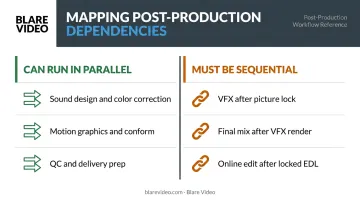
StudioBinder's production calendar framework — built on a Gantt-style structure — applies directly here: phases, deadlines, resources, and dependencies on a shared visual timeline.
Step 3: Assign Durations, Owners, and Buffer Time
Once phases are mapped, every task needs three things assigned to it:
- A duration scoped to the actual project complexity
- A named owner who is accountable for that deadline
- A buffer window built in for feedback delays, render time, or technical issues
Buffer isn't optional. It's what keeps an unexpected render failure or slow client approval from cascading into a missed delivery date.
Step 4: Build Review Cycles as Formal Scheduled Tasks
Client reviews are not informal checkpoints. Schedule them with a start date, a defined review window, and a revision turnaround deadline. Blare Video builds two structured rounds of revision into standard corporate packages and uses Wipster — a collaborative review platform — to give clients a way to leave timestamped, screen-specific comments in real time. That structure keeps revision cycles from becoming open-ended.
The minimum recommendation for any corporate video project: three formal review points: rough cut, fine cut/picture lock, and final graded and mixed version.
Step 5: Maintain the Schedule Actively
One person must own the schedule. Their job is to update it weekly — daily when timelines are compressed —, communicate changes to affected departments, and flag risks before they become delays. Without active upkeep, even a well-built schedule stops reflecting reality within days.
Common Post-Production Scheduling Mistakes to Avoid
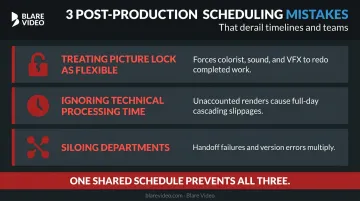
Three mistakes show up repeatedly across post-production projects of every size:
- Treating picture lock as flexible. Late editorial changes force the colorist, sound designer, and VFX team to redo completed work — at real cost. Set clear expectations with clients before post begins, not after someone requests a revision at the grading stage.
- Ignoring technical processing time. Proxy creation, transcoding, rendering, and exporting all consume hours that disappear from the schedule if not explicitly planned. Frame.io notes that dailies alone "can take many hours depending on workflow complexity, footage volume, and file sizes." Unaccounted overnight renders routinely cause full-day slippages that cascade downstream.
- Siloing departments. When the editor, colorist, sound designer, and VFX vendor each work from separate informal timelines, handoff failures multiply. A revision communicated to the editor but not the colorist can result in the wrong version being graded. One shared schedule with real-time visibility — not a chain of email threads — is the operational foundation of any well-run post workflow.
Frequently Asked Questions
How long does post-production take for a corporate video?
A standard interview or brand film runs one to three weeks in post; multi-asset campaigns or motion graphics-heavy projects extend to four to eight weeks. Think Branded Media's 2026 production guide puts corporate post at 12–18 days within a 30–45 day total window. Client approval speed is the single biggest variable.
What is picture lock and why does it matter for the schedule?
Picture lock is the point at which the edit is formally approved and no further changes will be made to the cut. It's the hard dependency that triggers sound design, color grading, VFX work, and online editing. Any editorial change after picture lock requires those departments to redo completed work, which pushes the delivery date.
Can post-production begin before filming is finished?
Yes. Editors can begin assembling scenes from daily footage before the shoot wraps — a standard practice on longer projects to compress the overall post timeline. Final editorial decisions still wait for all footage, but early assembly cuts reduce the time needed after production ends.
What is the difference between offline and online editing?
Offline editing involves cutting the project using compressed proxy files for speed and efficiency. The online edit (conform) reassembles that approved cut using original high-resolution camera files, then handles titles, captions, and technical fixes before the final color grade.
How many revision rounds should be built into a post-production schedule?
Plan for a minimum of two to three rounds: rough cut, fine cut or picture lock, and final graded/mixed version. Each round needs a defined turnaround window — open-ended revision cycles without deadlines are the most common cause of delivery slippage on corporate projects.
What happens if the post-production schedule slips?
Identify which phases have buffer and which cannot be compressed without quality impact, then communicate changes immediately to all affected departments. Document the cause and adjust the delivery date if necessary. Delays that go uncommunicated compound fast — one missed day rarely stays contained to one person.