Introduction
A car reveal video is often the only chance a brand gets to make a first impression on a new model. That pressure is real — according to Google research, 69% of people who used YouTube while buying a car were influenced by it, and premium buyers spent an average of 1 hour 41 minutes watching automotive video on YouTube during their purchase research.
That influence is earned through production quality — not the car itself. Brands, dealerships, and event producers consistently underestimate how much pre-production discipline, technical precision, and post-production craft go into a reveal that lands.
This guide covers what separates professional from amateur, the exact production steps involved, the equipment you need, and the mistakes that kill reveal videos before they reach an audience.
Key Takeaways
- Professional reveal videos require a defined concept, storyboard, shot list, and location plan before filming begins
- Filming requires wide, medium, close-up, and drone shots, plus on-set engine audio capture
- Color grading, sound design, and editorial pacing determine whether the final cut holds attention or gets skipped
- Lighting conditions, camera movement variety, vehicle preparation, and narrative structure are what elevate an average shoot to a compelling reveal
- The most common failures: skipping pre-production, ignoring audio, and approaching the shoot as documentation rather than storytelling
What Makes a Car Reveal Video Different From Regular Car Videography
Driving reviews, walkarounds, and feature highlights are built to inform. A reveal video has a different job: it introduces a vehicle to the world for the first time, which means the emotional and visual impact must be deliberate from the first frame.
The Structural Difference
Reveal videos have built-in expectations that standard car content doesn't:
- Concealment and build-up — the audience shouldn't see the full car immediately
- Controlled information release — often under embargo until a specific date, coordinating across press, social, and broadcast simultaneously
- Broadcast-quality production — the finished video will appear on YouTube, at press events, on TV, and across social platforms, often at the same time
That last point has real production consequences. A reveal video isn't optimized for one channel — resolution, framing, and pacing decisions all have to hold up across every platform simultaneously.
Two Formats, Two Production Approaches
Production teams need to understand which type of reveal they're executing before anything else:
Live event reveal coverage — filmed at a staged press event or auto show. Requires multi-camera setups, real-time switching or multicam editing, and a crew that can capture an unrepeatable moment with no second takes.
Pre-produced cinematic reveal film — fully scripted and shot over one or more days, then edited as a complete narrative deliverable. Most brand launches use this format for digital distribution because it allows total creative control.
Each demands a different crew structure, shot strategy, and editing approach. Treating them as interchangeable is one of the most common — and costly — early mistakes in reveal production.
How to Produce a Professional Car Reveal Video: Step-by-Step
Step 1: Develop the Creative Concept and Pre-Production Plan
Every strong reveal video is built on a single clear idea — not a feature list, but an emotional hook. Performance. Heritage. Innovation. A specific lifestyle. That creative brief needs to be locked before any logistics are organized.
From there, build out three pre-production documents:
- Moodboard — visual references that define tone, color palette, environment, and pacing. Even a rough one prevents wasted time arguing about feel on set.
- Storyboard — a shot-by-shot guide to the visual sequence. It doesn't need to be illustrated; a written shot-by-shot description works. The point is that everyone on the crew knows what they're building toward.
- Shot list with production schedule — flag which shots require special logistics: drone permits, closed road access, golden-hour windows, studio time, or on-screen talent.
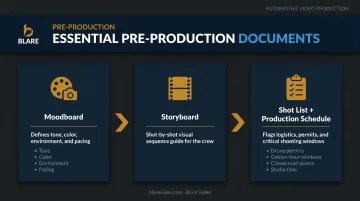
Blare Video's pre-production process follows exactly this structure — storyboarding, location scouting, and creative development handled before the first shoot day, so the crew arrives with a clear map rather than a general direction.
Step 2: Scout Locations and Prepare the Vehicle
Location scout in person when possible. Google Maps Street View works for initial screening, but it won't tell you about traffic patterns at 6 a.m., the direction the light hits at golden hour, or the road surface quality for rolling shots. Check for permitting requirements early — many urban locations and closed roads require advance notice.
The backdrop reinforces the car's identity. An urban environment reads differently from open desert or a studio against seamless white. Neither is wrong — but neither should be accidental.
Vehicle preparation checklist before the shoot:
- Professional detail, including tires dressed and glass cleaned
- No reflective smudges on paint or trim
- Any manufacturer embargo covers ready if needed
- Confirm color works for the filming environment — a bold color against neutral tones reads dramatically better than a dark car against a competing background
A car that hasn't been properly prepped adds hours to post-production — time that's better spent on color grading and platform edits.
Step 3: Execute the Shoot With a Disciplined Camera Strategy
Capture a full range of shot types. Wide shots establish the car in its environment. Medium shots show the profile, the stance, the proportions. Close-ups — emblems, brake calipers, exhaust tips, door handles, interior stitching — deliver the design details that make the vehicle feel real and desirable. Aerial drone footage conveys scale and motion that no ground-level shot can replicate.
The trap most productions fall into is over-relying on one technique. All gimbal shots become monotonous. All drone shots lose intimacy. Varying movement and focal length is what keeps the edit interesting.
Audio is not optional. Record engine start-up, exhaust note, door close, and interior sounds separately using a portable field recorder. The Zoom H4n Pro handles four-track simultaneous recording at 24-bit/96 kHz and 140 dB SPL. That headroom matters when you're positioned near a performance exhaust. Position microphones at the muffler, engine compartment, and rear tire area. Don't rely on camera-mounted mics; they won't capture the sonic character of the vehicle.
If the shoot includes a brand spokesperson or on-screen talent, prepare talking points in advance. Capture enough B-roll to support any interview segments in editing.
Step 4: Edit, Grade, and Distribute the Final Video
Edit close to the shoot date. The footage is freshest, the creative decisions from pre-production are still clear, and the narrative arc established in the storyboard is easier to execute before time creates distance from the shoot.
Structure the edit to build — teaser close-ups before the full car reveal, then feature highlights after the main moment. The reveal itself is the emotional peak; everything before it creates anticipation, everything after sustains momentum.
Color grading for automotive content requires specific attention to metallic finishes, which clip highlights easily and lose depth when overexposed. Blare Video uses DaVinci Resolve for color work, giving colorists node-based control to manage reflective surfaces, paint saturation, and environment tones separately.
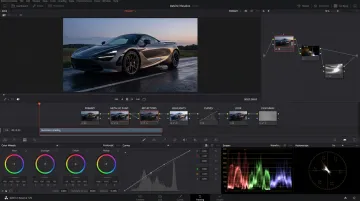
Finally, export for every platform — not as an afterthought, but as a planned part of the edit. Cutting platform-specific versions during the edit preserves shot composition in ways that cropping after export simply cannot. Google Ads data shows that campaigns including vertical video have seen 10% to 20% more conversions — which means the 9:16 cut isn't a nice-to-have.
Equipment Requirements for a Car Reveal Video
Equipment quality directly affects how credible the reveal feels. A new vehicle represents a significant brand investment — the production has to match that standard.
Camera and Support Equipment
| Equipment | Purpose | Notes |
|---|---|---|
| Cinema camera (4K minimum, LOG/RAW profiles) | Primary capture | RED Monstro 8K VV, RED Epic Dragon, or equivalent |
| Motorized gimbal | Fluid moving shots | Ronin RS2 or equivalent |
| Tripod | Locked-off static frames | Essential for controlled reveals |
| Camera car / rig mount | Rolling alongside vehicle | Requires advance coordination |
| Drone (DJI Inspire or equivalent) | Aerial coverage | Requires FAA Part 107 certified pilot |
Blare Video's automotive shoots have used RED Epic and RED Monstro 8K systems extensively. The LOG/RAW workflow these cameras produce preserves the dynamic range needed to capture shadow detail and bright paint finishes simultaneously — without clipping either end of the exposure.
On drones: FAA Part 107 certification is mandatory for commercial aerial operations. Controlled airspace requires prior authorization under 14 CFR 107.41. Blare Video maintains FAA-certified drone teams, which matters particularly for shoots near urban areas or event venues.
Audio and Lighting Requirements
Audio: Portable field recorder with XLR inputs and lavalier microphones rigged at the bumper, engine bay, and rear tire area. Do not rely on camera-mounted microphones for vehicle audio capture.
Lighting:
- Exterior shoots: Golden hour — first hour after sunrise or last before sunset — produces rich, saturated paint tones without the harsh specular highlights that midday sun creates on reflective bodywork. Paint, glass, and chrome each behave differently under different light sources, which is why timing matters as much as the gear itself.
- Studio/indoor reveals: Professional LED panels with diffusion to create even, flattering light without hot spots.
Common Mistakes to Avoid When Producing Car Reveal Videos
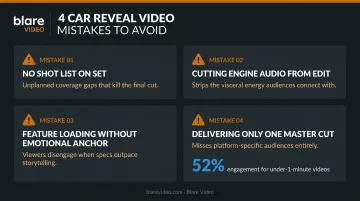
Arriving on set without a shot list. Showing up without a confirmed shot list, locked location, and defined narrative means the crew spends production hours making decisions that should have taken place days earlier. Missed shots and incoherent edits follow.
Cutting engine sound from the edit. Many reveal videos are shot beautifully and then edited with generic stock music over completely muted footage. That strips out one of the most emotionally powerful elements of any automotive video. Engine audio captured on set makes cuts land harder than any music track.
Loading up features without an emotional anchor. A video that lists specifications through title cards and voiceover without an emotional anchor feels like a brochure. The most effective reveals lead with a feeling or a question, then earn the right to show features.
Delivering only one master cut. A single 3-minute file cannot perform equally on YouTube, Instagram Stories, and a press event screen. Wistia data shows that videos under one minute average 52% engagement compared to significantly lower rates for longer content. The social cut isn't the main video trimmed down — it's a separate creative decision. Build platform versioning into the production plan from day one.
Frequently Asked Questions
How long should a car reveal video be?
Social cuts typically perform best under 60–90 seconds, while YouTube and event presentation versions can run 2–4 minutes. The channel should dictate the length — but every second, regardless of platform, needs to serve the narrative.
What equipment do you need to film a professional car reveal video?
The core kit: a 4K cinema camera with LOG/RAW profiles, a motorized gimbal, a tripod, a drone with a certified pilot, and a portable field audio recorder with microphones positioned on the vehicle. Specific gear scales with the distribution requirements and production budget.
What's the difference between a car reveal video and a car launch video?
A reveal video focuses on the first public unveiling of a new model, often under embargo until a set date. A launch video is typically produced after the car is public and may include driving footage, extended feature walkthroughs, or test drive content.
How much does it cost to produce a professional car reveal video?
Costs vary based on crew size, equipment package, aerial requirements, location complexity, post-production scope, and number of deliverables — each stage carries distinct drivers. Contact production companies directly for project-specific quotes.
Should a car reveal video include the engine sound?
Yes. Authentic engine audio captured on set with proper recording equipment is one of the most emotionally engaging elements of any automotive video. Capture it during the shoot even if the final mix will also include licensed music.
Do you need a professional video production company to produce a car reveal video?
A skilled single-operator can handle basic reveal content, but a full production team with dedicated camera, audio, lighting, and post roles raises the quality ceiling considerably. For major brand launches, multi-city campaigns, or broadcast deliverables, a professional crew is essential.