So video is clearly where attention lives. The problem is that most beginners have no idea where to start.
Confusing terminology, gear anxiety, unclear workflow stages — the learning curve feels steep before you've shot a single frame. This guide cuts through that. You'll learn how digital video production actually works, what each stage involves, what equipment you need, and — critically — when it makes more sense to hire professionals than go it alone.
Key Takeaways
- Digital video production follows three stages: pre-production, production, and post-production — skipping pre-production is where most beginner projects fall apart
- Audio quality matters more than camera quality; bad sound kills credibility
- Match your shooting specs to your target platform before you film — not during editing
- DIY works for low-stakes content; brand-facing video for clients, ads, or events warrants professional production
- Blare Video provides full-service production for corporate, commercial, and event video across major U.S. markets
What Is Digital Video Production?
Digital video production is the end-to-end process of creating video content using digital tools — cameras, smartphones, and editing software — rather than analog film. The "digital" distinction matters practically: footage is editable immediately, costs are lower, and finished content can be shared the same day it's shot.
Video production and filmmaking aren't the same thing. Filmmaking typically means feature-length cinematic work with large crews, long schedules, and theatrical distribution. Video production focuses on shorter, purpose-driven content — corporate videos, brand ads, event coverage, social media clips, training materials. The scope is fundamentally different, which makes the workflow far more accessible to beginners and smaller teams.
That accessibility is why so many businesses now produce video regularly. Most teams don't struggle with the technology itself. They struggle with understanding the production process well enough to execute it consistently.
The Three Stages of Digital Video Production
Every successful video project runs through the same three phases: pre-production, production, and post-production. Professional videographers treat this framework as non-negotiable. Beginners tend to jump straight to filming — and that's where most projects go wrong.
Pre-Production: Planning Your Video
Pre-production covers everything that happens before a camera rolls. According to Videomaker, it's cheaper to work out story and message problems on paper than in front of the lens — and a shot list prevents missed footage that becomes a reshoot or a difficult post-production fix.
Key deliverables before you film:
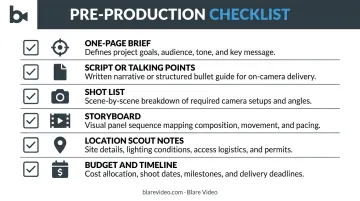
- One-page brief: the video's goal, target audience, and core message
- Script or talking points: a scene-by-scene roadmap; don't shoot without a finalized version
- Shot list: every angle and setup organized by location
- Storyboard: especially useful for complex scenes, motion graphics, or specific camera movements
- Location scout notes: flag noise issues, lighting conditions, and access logistics
- Budget and timeline: even small projects benefit from a written estimate
That last point matters more than most beginners expect. Blare Video builds this planning layer into every project regardless of scope, including a coordination call between the client, their representative, and the crew — so everyone arrives on set aligned rather than improvising.
Production: Capturing Footage
Production is execution: showing up, setting up, and getting the footage. That means following the shot list, managing lighting and audio, and coordinating your subjects — whether they're professional actors or corporate employees doing this for the first time.
A practical tip from experienced crews: set up and test your lighting and audio using a stand-in before your subject arrives. Non-actors grow uncomfortable quickly on set. If they walk in and have to wait 20 minutes while you adjust gear, you lose them. Have everything dialed before they sit down, and they can start talking almost immediately.
Also: always capture B-roll. Your primary footage (interviews, main scenes) needs supporting visuals that editors use to cover cuts, add context, and fix pacing problems that weren't visible on set. Common B-roll includes:
- Cutaway shots of relevant objects or environments
- Close-ups of hands, products, or details
- Wide establishing shots of the location
- Action sequences showing a process in motion
Post-Production: Editing and Finalizing
Post-production begins once filming wraps and footage is backed up. The workflow typically moves in this order:
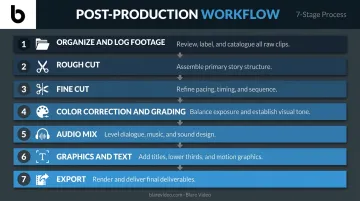
- Organize and log footage — label clips, identify the best takes
- Rough cut — sequence the story without worrying about perfection
- Fine cut — tighten pacing, remove dead air, sharpen transitions
- Color correction and grading — balance exposure across clips; set the visual mood
- Audio mix — balance dialogue, music, voiceover, and sound effects
- Graphics and text — titles, lower thirds, call-to-action overlays
- Export — deliver in the correct format and specs for the target platform
Post-production is consistently the most time-intensive phase. A short brand video might take one day to shoot and several days to edit well.
Blare Video's standard workflow includes footage transcoding into proxy files for efficient editing, DaVinci color correction on advanced projects, and a collaborative review process using Wipster — a platform where clients drop time-stamped notes directly on the video rather than emailing feedback back and forth.
Common Types of Digital Video Content
Knowing what kind of video you're making shapes every decision that follows — length, tone, crew size, budget, and platform.
The most widely produced video formats include:
- Promotional and brand videos — showcase products or services to prospective customers
- Corporate interviews and testimonials — client or employee-facing; high credibility when done well
- Event highlight reels — conference recaps, product launches, trade show coverage
- Short-form social media content — vertical or square formats optimized for Reels, TikTok, LinkedIn
- Educational and training videos — internal use or customer onboarding
- Product demos and explainers — 96% of people have watched an explainer video to learn about a product or service, which makes this format one of the most reliable for driving purchase decisions
Blare Video produces across all of these categories — from testimonial series for renewable energy and construction companies to event documentation for clients like TikTok and the American Association of Endodontists, and branded content for brands like Taco Bell.
One decision to settle early: is this video for an owned channel (your YouTube, website, internal LMS) or paid distribution (broadcast TV, sponsored content)? Paid distribution typically requires higher production quality and specific technical delivery specs from the network or platform — define that intent before pre-production begins, since it shapes every downstream choice.
Essential Equipment and Skills for Beginners
Starter Gear
You don't need a cinema-grade rig to start. A realistic beginner kit includes:
| Equipment | Entry Level | Professional |
|---|---|---|
| Camera | Modern smartphone or DSLR | RED Epic, Sony FS7, Canon C300 |
| Microphone | Lavalier or shotgun mic | Wireless lav systems, boom rigs |
| Lighting | LED panel or softbox | Kino Flo, HMI units |
| Stabilization | Tripod | Gimbal, slider, dolly |
| Editing software | DaVinci Resolve (free) | Adobe Premiere Pro, Final Cut Pro |
One note on cameras: the gap between entry-level and professional gear is real, but it rarely determines the quality of a beginner's first projects. Skilled operators routinely produce strong work on a smartphone with decent audio and lighting.
Skills That Matter More Than Gear
For beginners, storytelling ability outweighs camera specs. Focus on these in order:
- Camera operation and basic composition — framing, rule of thirds, depth of field
- Audio recording — this is the highest-impact skill; covered below
- Storytelling structure — clear beginning, middle, end
- Basic editing — cut on action, eliminate dead air, sequence for pace
Color grading, motion graphics, and sound design are worth learning eventually — but only after the fundamentals are solid. Pick one skill from the list above, practice it on a short project, then move to the next.
Practical Tips for Shooting Better Digital Videos
Prioritize Audio Above Everything Else
A USC-reported 2018 study by Newman and Schwarz found that when audio quality was poor, viewers rated the speaker as less intelligent, less likeable, and the content as less important — even when the information was identical. Poor audio actively damages credibility, not just viewer experience.
Never rely on a camera's built-in microphone. Use an external lavalier (clipped to the subject) or a shotgun mic on a boom. Scout your location for background noise before committing to it — HVAC systems, street traffic, and open spaces with echo are common problems that kill otherwise good footage.
Use Three-Point Lighting
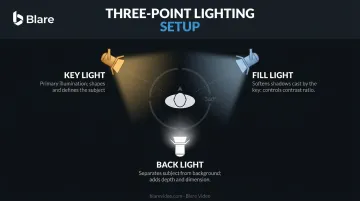
The standard beginner setup that professional crews default to:
- Key light — the main source, positioned at roughly 45 degrees to the subject
- Fill light — softer, opposite side, reduces harsh shadows from the key
- Back light — positioned behind the subject to separate them from the background
Soft, diffused light (softboxes or indirect natural light through a window) produces a more professional result than harsh direct light. If you're outdoors, shade is your best friend.
Keep Backgrounds Intentional
A cluttered or distracting background pulls attention away from your subject. A few practical rules:
- Choose contextually relevant backdrops — a tidy office, a branded wall, or a purposeful environment
- Avoid anything busy, reflective, or unrelated to your subject matter
- If the location doesn't cooperate, shoot with a wider aperture to blur the background using shallow depth of field
Shoot More Than You Think You Need
Multiple takes of every scene. Generous B-roll. Capture multiple angles. You cannot go back and reshoot affordably — but you can always cut footage you don't need. Too much material in editing is a luxury. Too little is a problem with no real solution.
Match Specs to Platform Before You Film
Shooting for the wrong format creates composition problems that can't be fully fixed in post. Use this as a quick reference before your shoot:
| Platform | Aspect Ratio | Frame Rate | Notes |
|---|---|---|---|
| YouTube | 16:9 | 24, 25, 30, 48, 50, or 60 fps | Standard HD delivery |
| Instagram Reels | 9:16 (or up to 1.91:1) | Min 30 fps | Minimum 720px resolution |
| TikTok | 9:16 vertical | 30 fps standard | Min 540x960px |
| Corporate presentations | 16:9 | N/A | Default PowerPoint/Keynote format |
Decide your platform before you shoot.
When to DIY and When to Hire a Professional Video Production Company
Most businesses use a hybrid approach. Wyzowl's 2026 data shows 59% produce video in-house and 32% mix in-house with external vendors. The decision comes down to stakes, not budget alone.
DIY Works When:
- Content is for internal communications or casual social media
- Speed and frequency matter more than production quality
- The video won't be seen by external audiences or represent the brand in high-trust contexts
Hire Professionals When:
- The video will live on your website, in ads, at events, or in client-facing presentations
- You need multiple locations, larger crews, or specialized equipment
- The brand's reputation is on the line
The quality-trust connection is real: 89% of consumers say video quality affects their trust in a brand, per Wyzowl. A shaky, poorly lit, echo-heavy testimonial on your homepage does more damage than no video at all.
What DIY Actually Costs
The hidden costs of DIY production at scale add up fast:
- Equipment purchase or rental
- Software subscriptions
- Time spent learning tools you'll use infrequently
- Reshoots from avoidable errors
- Post-production hours that weren't budgeted
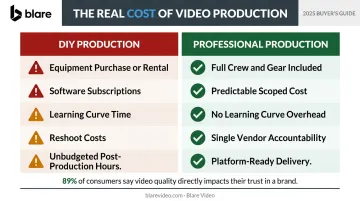
For one-off or high-stakes projects, outsourcing to a professional company often costs less than the sum of those parts.
What a Full-Service Company Brings
A full-service production company like Blare Video manages every phase: script development, shoot coordination, professional crew, and post-production delivery. That means clients aren't stitching together freelancers or managing logistics across vendors.
A typical engagement covers:
- Directors and directors of photography (DPs)
- Professional lighting and audio equipment
- Color grading and sound mixing
- Motion graphics and platform-specific exports
For companies operating across multiple markets, Blare Video also provides local crews in cities including Los Angeles, San Diego, Las Vegas, Phoenix, Chicago, New York, and Dallas — removing the overhead of building an in-house team.
Frequently Asked Questions
What is digital video production?
Digital video production is the end-to-end process of creating video content using digital cameras, smartphones, and editing software. It covers everything from planning and filming to editing and distribution, as opposed to analog film-based methods.
What does a digital content producer do?
A digital content producer oversees the full video creation process: developing concepts, managing scripts and schedules, coordinating crew and equipment, and ensuring the final video meets its intended goal and quality standard.
Is a DOP a videographer?
Not exactly. A Director of Photography (DOP or DP) is a senior creative role responsible for the overall visual look of a production and leads the camera and lighting crew. A videographer typically operates the camera directly, often as a one-person crew on smaller projects.
What is the 80/20 rule in video editing?
In editing, 80% of your time typically goes toward a small fraction of decisions: fine-tuning pacing, color, and audio rather than the initial rough cut. Experienced editors remove weak footage early, so they're only polishing material worth keeping.
What equipment do I need to start digital video production?
Start with a capable camera (DSLR, mirrorless, or modern smartphone), an external microphone, basic lighting, a tripod, and free editing software like DaVinci Resolve. Of these, audio quality is the first upgrade priority — it has the most visible impact on perceived professionalism.
How long does the digital video production process typically take?
A simple social media video might take a day to shoot and a few days to edit. A corporate brand video with multiple locations typically requires one to two weeks of pre-production, one to several shoot days, and two to three weeks in post-production for the first cut, revisions, and final delivery.